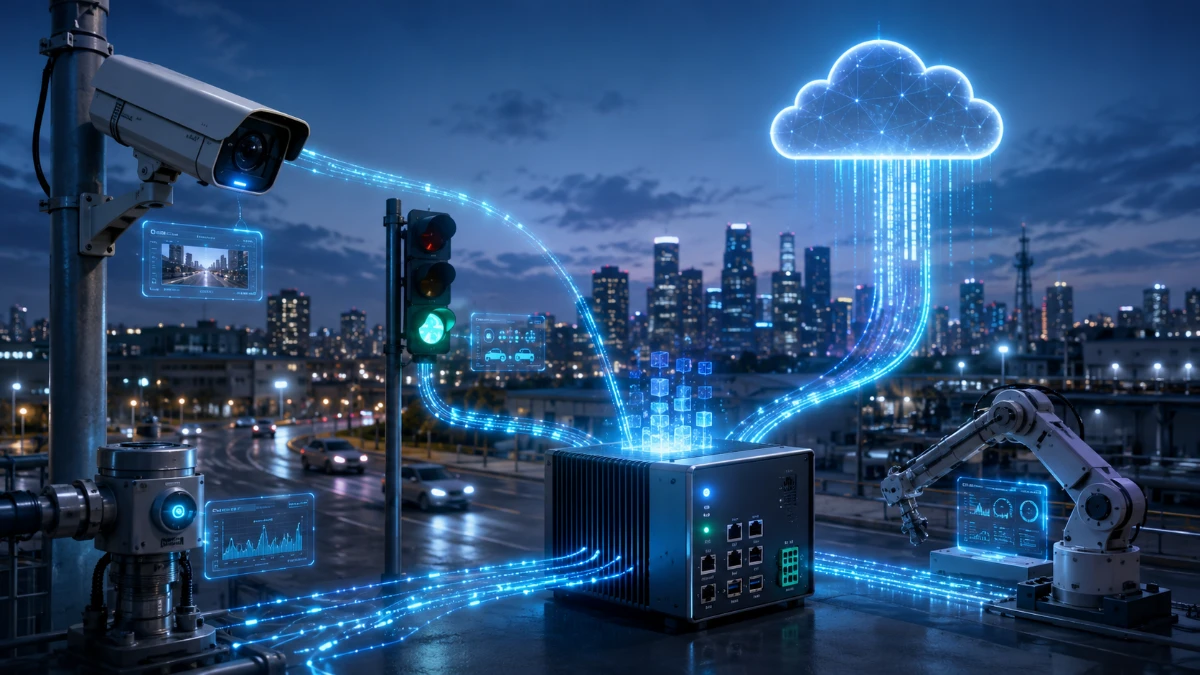
Edge computing processes information closer to the devices and people that create it, helping some digital services respond faster, use less network capacity and continue operating when cloud connections are limited.
Every day, smartphones, security cameras, factory machines, vehicles and smart-home devices generate enormous amounts of data.
Some of that information is sent to large cloud data centers, where powerful computers store it, analyze it and return a result. This cloud-based model supports many of the services people use every day, including email, video streaming, online storage and business applications.
However, sending every piece of data to a distant data center is not always the fastest or most practical option.
A self-checkout system may need to recognize an item immediately. A factory sensor may need to detect a dangerous equipment problem within milliseconds. A vehicle cannot always wait for a distant server before responding to changing road conditions.
Edge computing addresses this challenge by moving some storage and processing closer to the location where data is created or consumed.
The “edge” may be a smartphone, a smart camera, a factory computer, a local server or a smaller data center located near users. It is not one specific device or location. It describes a distributed approach to computing.
What Is Edge Computing?
Edge computing is a model in which data is processed closer to its source rather than being sent first to a distant centralized data center.
Amazon Web Services describes edge computing as bringing information storage and computing capabilities closer to the devices that produce information and the users who consume it. IBM similarly defines it as a distributed computing framework that places applications closer to data sources such as connected devices and local servers.
Consider a security camera installed outside a store.
Without edge computing, the camera might send a continuous video stream to a remote cloud platform for analysis. The cloud system would examine the footage and send an alert if it detected unusual activity.
With edge computing, a processor inside the camera or on a nearby local server could analyze the video first. It might send only an alert, a short video clip or selected metadata to the cloud.
The camera still benefits from cloud services, but it does not need to upload every second of footage before making a basic decision.
What Does “The Edge” Mean?
The edge is the part of a computing system located close to users, machines or data-producing devices.
There is no single universal edge location. Depending on the application, it could be:
-
A processor inside a smartphone
-
A computer installed in a vehicle
-
A gateway connecting smart-home devices
-
A server inside a retail store
-
A computer system on a factory floor
-
Equipment located at a cellular network site
-
A regional data center close to a major city
-
A content-delivery server located near internet users
The edge can therefore range from a small sensor to a large industrial facility. NIST publications describe computing as a continuum extending from centralized cloud data centers through near-edge and far-edge systems to individual devices.
What these locations share is proximity. They are positioned closer to the activity they support than a traditional centralized cloud region.
How Does Edge Computing Work?
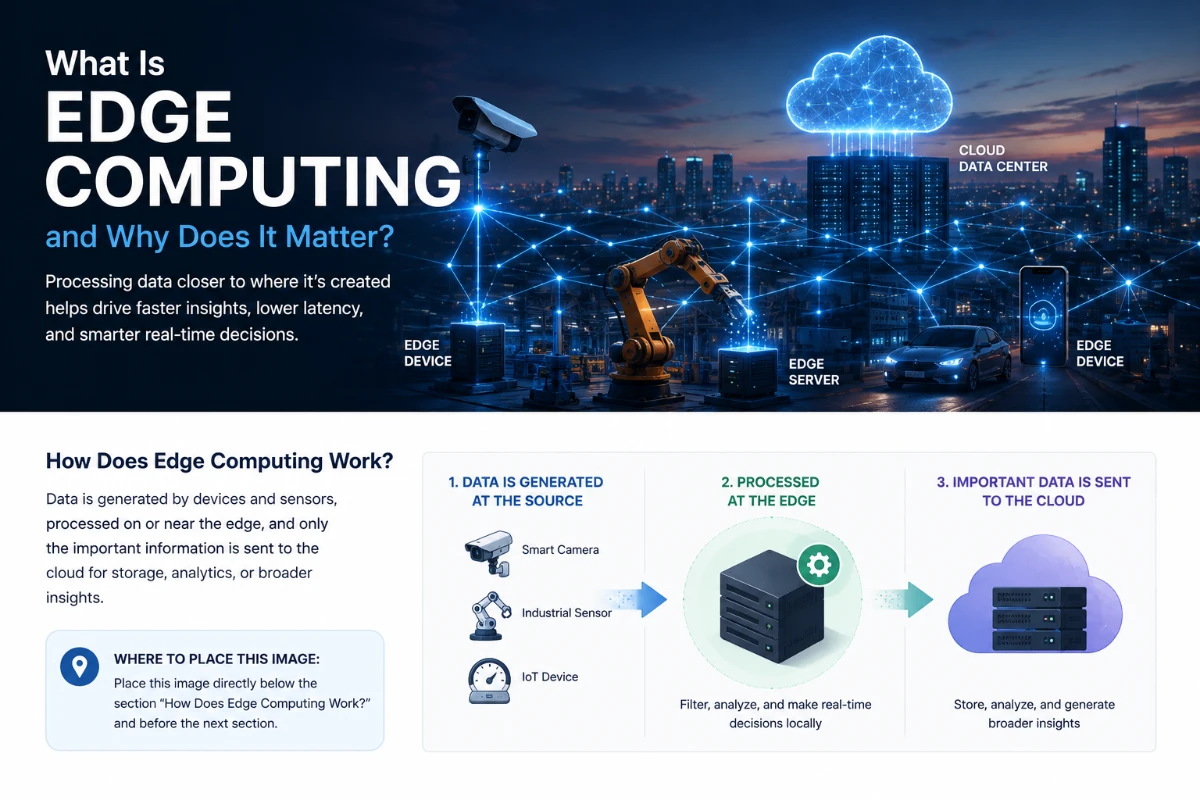
A basic edge-computing system usually involves three layers.
1. The device
A device collects or creates data.
Examples include:
-
A camera capturing video
-
A sensor measuring temperature
-
A smartwatch recording movement
-
A machine tracking vibration
-
A vehicle collecting location and speed information
Some devices can process the information themselves. Others send it to a nearby edge system.
2. The edge system
An edge device, gateway or local server analyzes the data.
It may:
-
Filter unnecessary information
-
Detect specific events
-
Run an artificial intelligence model
-
Generate an immediate response
-
Temporarily store information
-
Send selected data to the cloud
3. The cloud or central data center
The cloud may still perform tasks that require more computing power, longer-term storage or information from many locations.
For example, a factory’s local edge server could monitor equipment in real time, while a cloud platform analyzes performance trends across dozens of factories.
The edge handles immediate local work. The cloud provides centralized coordination, large-scale analysis and long-term storage.
Edge Computing vs. Cloud Computing
Edge computing and cloud computing are sometimes presented as competing technologies, but they usually work together.
Cloud computing provides access to shared computing resources, applications and storage over a network. NIST defines cloud computing as on-demand access to a shared pool of configurable resources that can be rapidly provided and released.
Cloud platforms are valuable because they can offer:
-
Large amounts of computing power
-
Flexible storage capacity
-
Centralized data management
-
Access from many locations
-
Easier application deployment
-
Tools for large-scale analytics and AI
Edge computing is better suited to some tasks because it reduces the distance data must travel.
It may provide:
-
Faster local responses
-
Lower network usage
-
Continued operation during connection problems
-
Greater control over where some data is processed
-
Support for devices in remote locations
A modern system may use both approaches.
For example, a retailer could run checkout and inventory systems locally while using the cloud to compare sales across hundreds of stores.
The question is not usually whether edge or cloud is universally better. The question is which tasks should run at each location.
Why Does Processing Location Matter?
The physical location of computing resources can affect speed, reliability, privacy and cost.
When data travels to a distant data center, it must move through multiple network connections. Even at high speeds, this creates delay.
For many everyday activities, the delay is too small to notice. An additional fraction of a second may not matter when backing up a photograph or opening a document.
For other applications, small delays can be important.
Examples include:
-
Industrial safety systems
-
Live video analysis
-
Robotics
-
Interactive gaming
-
Augmented reality
-
Traffic-management systems
-
Medical monitoring
-
Connected vehicles
Edge computing can reduce the time between collecting information and taking action.
What Is Latency?
Latency is the delay between sending a request and receiving a response.
Suppose a device sends data to a cloud region located hundreds or thousands of miles away. The information must travel to the cloud, be processed and return to the device.
The entire process may happen quickly, but network congestion, distance and connection quality can increase the delay.
Edge computing reduces some of that travel by placing computing resources closer to the device.
AWS notes that edge infrastructure can support applications requiring very low latency, including live video, gaming, machine-learning inference and augmented or virtual reality.
However, edge computing does not automatically guarantee instant responses. Performance still depends on the device, software, local network and workload.
Common Examples of Edge Computing
Many people interact with edge computing without realizing it.
Smartphones
Modern phones process photographs, voice commands and biometric authentication directly on the device.
Some tasks may be completed locally, while more complex requests are sent to a cloud service.
Smart security cameras
A camera may identify motion, people, vehicles or packages locally instead of continuously uploading all video for analysis.
Content-delivery networks
Content-delivery networks place copies of website files, images and videos closer to users.
When someone opens a website, the content may come from a nearby server rather than the website’s central location. This can improve loading speed and reduce pressure on the original server.
Google Cloud describes its content-delivery network as using globally distributed edge locations to cache content close to users.
Retail stores
Stores may use local computing for checkout systems, inventory tracking, cameras and digital displays.
If the internet connection becomes unstable, some services may continue operating locally.
Factories
Industrial machines can generate continuous streams of information about temperature, pressure, vibration and output.
Edge systems can detect unusual patterns and alert workers without waiting for cloud processing.
Vehicles
Vehicles contain computers that analyze information from cameras, radar, controls and other sensors.
Some decisions must happen inside the vehicle because a network connection may be unavailable or too slow.
Healthcare devices
Wearable monitors and medical equipment can process some measurements locally and send selected information to healthcare systems.
The exact design must account for accuracy, privacy, safety and regulatory requirements.
How Edge Computing Supports Artificial Intelligence
Artificial intelligence models do not always need to run in large cloud data centers.
Smaller or optimized models can run on smartphones, cameras, industrial equipment and local servers. This approach is commonly called edge AI.
Edge AI can be used for:
-
Image recognition
-
Speech processing
-
Equipment monitoring
-
Document scanning
-
Product inspection
-
Fraud detection
-
Predictive maintenance
-
Personalized device features
IBM defines edge AI as running AI algorithms or models on edge and connected devices such as smartphones, thermostats and wearable monitors.
Processing AI tasks locally can reduce latency and limit the amount of raw data that needs to leave a device.
However, edge devices usually have less computing power, memory and energy capacity than cloud data centers. Developers may need to create smaller models or simplify the task.
More demanding AI work may still be performed in the cloud.
Can Edge Computing Reduce Network Traffic?
Yes, because an edge system can filter information before sending it elsewhere.
Imagine a factory containing thousands of sensors that record data every second.
Sending every measurement to the cloud could require significant network capacity and storage. A local system could instead analyze the stream and upload only:
-
Unusual readings
-
Hourly summaries
-
Maintenance alerts
-
Selected historical records
The cloud receives the information needed for broader analysis without storing every raw measurement.
This can reduce bandwidth use and cloud-storage costs.
The result depends on the application. Some organizations must preserve complete records for legal, scientific or operational reasons. In those cases, local processing may not substantially reduce the volume of stored data.
Can Edge Computing Work Without the Internet?
Some edge systems can continue performing local functions when their cloud connection is unavailable.
A factory machine may continue monitoring safety conditions. A retail system may temporarily record transactions. A smart-home device may continue following local automation rules.
Once the connection returns, the edge system can synchronize information with the cloud.
This ability can be valuable in:
-
Rural areas
-
Ships and aircraft
-
Construction sites
-
Mines
-
Remote energy facilities
-
Disaster-response environments
-
Locations with unstable connectivity
However, offline operation is not automatic. The system must be specifically designed to handle connection failures, store information safely and resolve synchronization problems later.
Some features may still stop working without cloud access.
Does Edge Computing Improve Privacy?
Edge computing can support privacy by allowing some information to remain on a device or within a local environment.
For example, a camera might determine whether a room is occupied without sending continuous footage to an outside server. A phone might process a biometric login locally rather than uploading biometric data.
This can reduce the amount of sensitive raw information transmitted across networks.
However, edge computing is not automatically private.
An edge device may still:
-
Collect excessive information
-
Store data insecurely
-
Send results to third parties
-
Use weak access controls
-
Retain information longer than necessary
-
Be physically stolen or modified
Privacy depends on how the entire system is designed, including its software, policies and data-sharing practices.
Processing location is only one part of privacy protection.
Is Edge Computing More Secure?
Edge computing can improve some aspects of security, but it can also create new risks.
Keeping selected data local may reduce exposure during transmission. Local systems may also respond quickly to suspicious activity.
At the same time, edge computing distributes technology across many locations.
Instead of securing a small number of centralized data centers, an organization may need to protect:
-
Cameras
-
Sensors
-
Gateways
-
Retail servers
-
Factory computers
-
Vehicles
-
Remote network equipment
Some devices operate in places where attackers can physically access them. Others may run outdated software or use default passwords.
A compromised edge device could provide access to sensitive data or the broader network.
Important protections include:
-
Strong device authentication
-
Regular software updates
-
Encryption
-
Network segmentation
-
Secure startup processes
-
Physical security
-
Remote monitoring
-
The ability to disable lost or compromised equipment
Edge computing changes where security must be managed. It does not remove the need for cybersecurity.
What Are the Main Benefits of Edge Computing?
Faster responses
Processing closer to the source can reduce latency for time-sensitive applications.
Lower bandwidth use
Edge systems can filter, summarize or analyze data before sending it to the cloud.
Greater resilience
Some local operations may continue during internet or cloud-service disruptions.
More control over data
Organizations can decide which information remains local and which information is transmitted.
Support for remote environments
Edge systems can operate in locations with limited or unreliable connectivity.
Better real-time automation
Machines and software can respond quickly to local conditions.
These benefits are not guaranteed. They depend on how well the system is planned and maintained.
What Are the Limitations of Edge Computing?
More devices to manage
Distributed systems may include thousands of devices across many locations.
Each one may require configuration, monitoring and updates.
Limited computing resources
A small edge device cannot match the processing power of a large data center.
Physical exposure
Equipment in stores, vehicles or public locations may be damaged, stolen or manipulated.
Inconsistent hardware
Organizations may need to support many device types, processors and operating systems.
Data synchronization problems
Local and cloud systems must keep information consistent, especially after connection outages.
Higher operational complexity
Businesses need tools and staff capable of managing both cloud and edge infrastructure.
Security challenges
Every connected device can become a possible point of attack.
For these reasons, edge computing should be used where its benefits justify the added complexity.
Edge Computing and 5G
Edge computing is often discussed together with 5G networks.
5G can provide faster wireless connections and lower network latency under suitable conditions. Edge infrastructure located within or near telecommunications networks can process data without sending it to a distant cloud region.
This combination may support applications such as:
-
Interactive gaming
-
Live video production
-
Augmented reality
-
Industrial automation
-
Transportation systems
-
Connected public infrastructure
However, 5G and edge computing are separate technologies.
An edge system can operate over Wi-Fi, wired networks or older mobile networks. A 5G connection does not necessarily mean an application uses edge computing.
The two technologies can complement each other, but neither requires the other in every situation.
Will Edge Computing Replace the Cloud?
Edge computing is unlikely to replace cloud computing.
Large cloud platforms remain useful for:
-
Long-term storage
-
Training advanced AI models
-
Combining information from many locations
-
Centralized security management
-
Large-scale business applications
-
Software development and deployment
-
Backup and disaster recovery
Edge systems are useful for immediate and location-specific tasks.
The most practical model is often a cloud-edge continuum in which workloads are placed according to their requirements.
A simple task may run directly on a device. A local server may handle time-sensitive analysis. The cloud may provide coordination, historical reporting and more powerful processing.
The boundaries can also change over time as devices, networks and software improve.
When Does Edge Computing Make Sense?
Edge computing is most valuable when at least one of the following conditions is important:
-
The application requires very fast responses.
-
The location has unreliable connectivity.
-
Sending all raw data would be expensive.
-
Some information should remain local.
-
The system must continue operating during an outage.
-
A large number of connected devices produce continuous data.
-
Local automation is essential.
It may be less useful when:
-
The workload is not time-sensitive.
-
The organization already has a reliable cloud connection.
-
Centralized processing is simpler and less expensive.
-
The edge hardware would be difficult to secure or maintain.
-
All information must be combined before it can be useful.
Businesses should evaluate the actual problem rather than adopting edge computing simply because it is a popular term.
The Bottom Line
Edge computing moves selected data processing and storage closer to the devices, machines and people that create or use information.
It can reduce delays, lower network traffic and help services continue operating when cloud connections are limited. It is particularly useful for connected devices, industrial systems, retail environments, real-time video and some artificial intelligence applications.
However, edge computing does not eliminate cloud services. In most modern systems, the edge and cloud work together.
Local devices handle tasks that require speed, resilience or proximity. Centralized data centers provide larger computing resources, coordination and long-term storage.
The technology matters because the digital world is becoming more distributed. As more devices generate information, organizations must decide not only how data is processed, but also where that processing should happen.
Comments 0