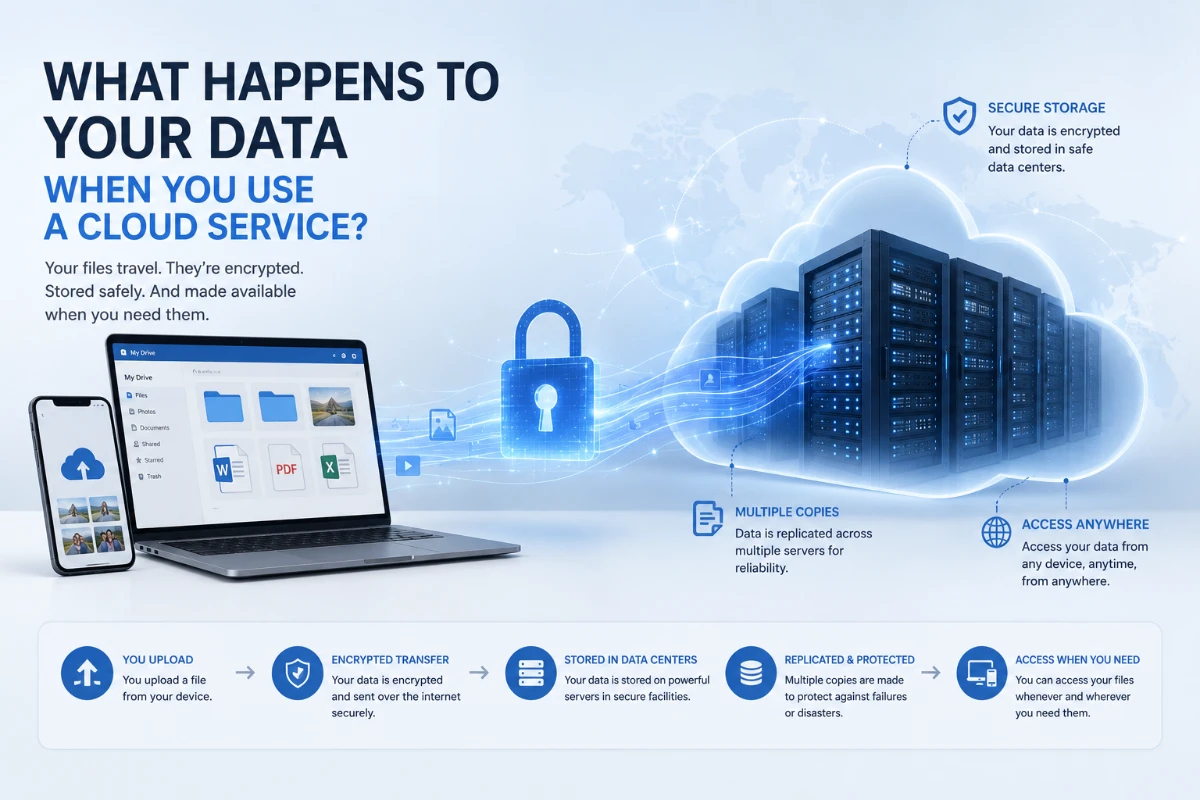
Uploading a file to the cloud usually means sending it to remote data centers, where it may be encrypted, copied across storage systems and made available through your account. However, cloud security still depends on the provider, the service settings and the way users protect their accounts.
People use cloud services every day, often without thinking about the technology behind them.
A photograph may be backed up automatically from a phone. A document can be edited from several devices. A business application may store customer records without keeping them on a computer inside the company’s office.
In each case, data is being processed or stored on computing infrastructure operated by another organization.
The word “cloud” can make this process sound abstract, as though information is floating somewhere on the internet. In reality, cloud data is stored and processed by physical servers, storage devices and networking equipment located inside data centers.
When a user uploads a file, the data travels across a network to systems operated by the cloud provider. The service may encrypt it, divide it into smaller pieces, create redundant copies and store related information about the user, device and activity.
What happens next depends on the provider, the type of service and the settings selected by the customer.
What Is a Cloud Service?
A cloud service provides access to computing resources over a network.
The National Institute of Standards and Technology defines cloud computing as on-demand access to a shared pool of configurable resources such as servers, storage, networks, applications and services. These resources can be provided and released with relatively little direct management by the user.
Cloud services can include:
-
Online file storage
-
Email platforms
-
Photo backup services
-
Streaming applications
-
Business software
-
Website hosting
-
Databases
-
Artificial intelligence tools
-
Virtual computers
-
Collaboration platforms
Some cloud services are designed for individual consumers. Others are built for businesses, governments or software developers.
The underlying concept is similar: instead of relying entirely on computing equipment owned and maintained by the user, the service delivers storage, software or processing capacity through remote infrastructure.
What Happens When You Upload a File?
Uploading a file to a cloud service usually involves several stages.
1. The application prepares the file
The service’s application or website identifies the file and may create supporting information about it.
This information can include:
-
File name
-
File type
-
File size
-
Creation date
-
Account identifier
-
Device information
-
Folder location
-
Sharing permissions
Some applications may compress a file, divide it into smaller pieces or create a preview before the upload begins.
2. The file travels over a network
The device sends the data through a local network and the internet toward the cloud provider.
The information may pass through:
-
A home or office router
-
An internet service provider
-
Regional network infrastructure
-
Content-delivery or routing systems
-
The cloud provider’s network
Modern services commonly use encrypted connections to protect data during this journey.
Amazon S3, for example, supports HTTPS connections using Transport Layer Security to protect information while it moves between a user and the service. Google Cloud also describes authentication, integrity checks and encryption as central protections for data moving through its infrastructure.
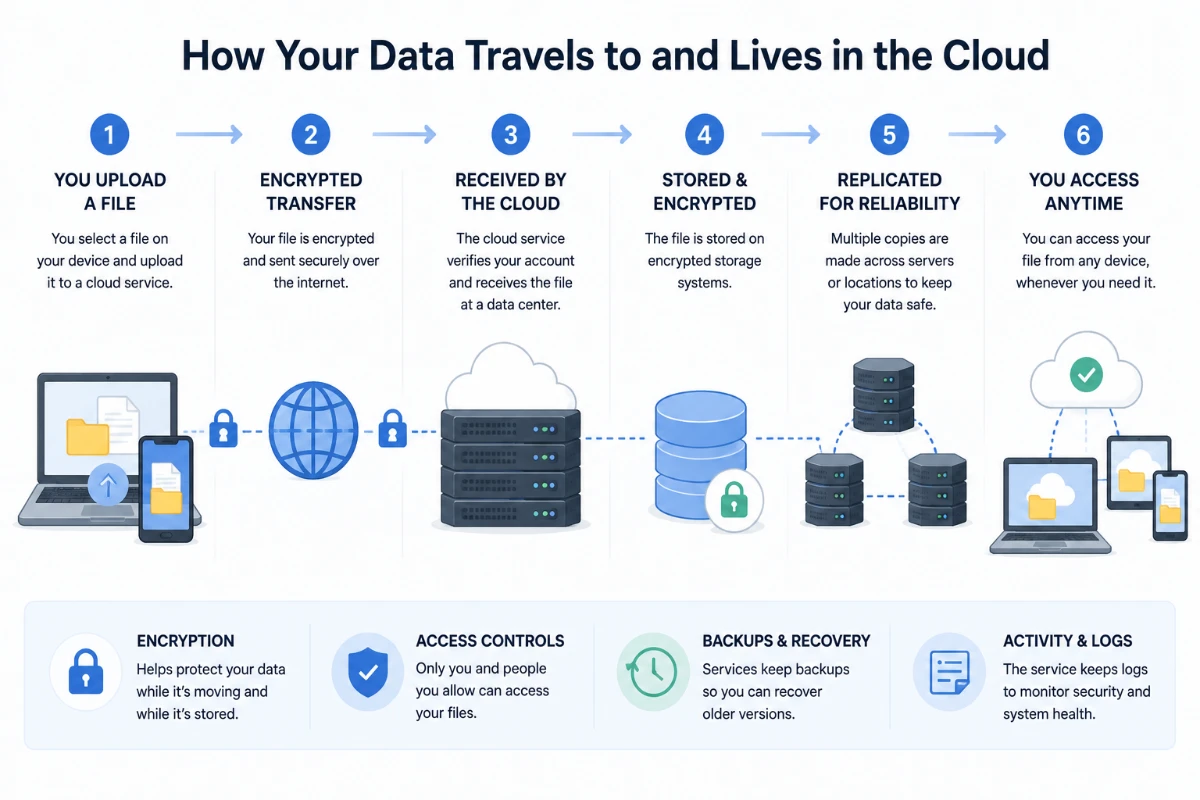
3. The provider authenticates the request
The service verifies that the upload request is associated with a valid account, application or access credential.
For an individual user, this may involve a logged-in session.
For a business application, the request may rely on:
-
An API key
-
A security token
-
A service account
-
A digital certificate
-
A temporary access credential
If the authentication is accepted and the account has permission to upload the file, the cloud platform continues processing it.
4. The data reaches a data center
The file arrives at infrastructure operated by the cloud provider or one of its authorized partners.
The provider may route the information to a particular location based on:
-
The user’s region
-
Service availability
-
Customer configuration
-
Legal requirements
-
Network performance
-
Storage capacity
-
Disaster-recovery design
The closest data center is not always selected. A customer may choose a particular region, while a consumer application may make that decision automatically.
5. The file is stored
The provider writes the file to physical storage equipment.
Depending on the service, the file may be stored on:
-
Solid-state drives
-
Hard disk drives
-
Specialized object-storage systems
-
Archival storage media
-
Several types of storage across its lifecycle
The service records information that allows it to locate, retrieve and manage the file later.
Is Cloud Data Stored in One Place?
Not necessarily.
A cloud provider may divide, distribute or copy data across multiple storage devices.
This can improve reliability. If one disk, server or storage component fails, the service may retrieve another copy instead of losing the file.
Depending on the service and customer settings, copies may be stored:
-
In different racks inside one building
-
Across separate areas of a data center
-
In multiple data centers within one region
-
Across several geographic regions
-
In an independent backup environment
Providers do not use one universal design. The amount of redundancy depends on the product, storage class, service agreement and customer configuration.
For example, a low-cost archival service may have different availability and recovery characteristics from a premium business-storage service.
Users should not assume that every cloud file automatically has unlimited backups in several countries.
What Is Data Replication?
Replication is the process of creating and maintaining multiple copies of data.
If one storage system becomes unavailable, another copy may allow the service to continue operating.
Replication can protect against certain hardware failures, but it is not the same as a complete backup strategy.
If a user accidentally deletes a synchronized file, the deletion may also be replicated. If ransomware encrypts files in a connected folder, the changed versions may be synchronized to the cloud.
Replication helps maintain availability. A backup is intended to preserve a recoverable version of information from an earlier point in time.
Some services provide both features, but users should understand the difference.
What Is Encryption in Transit?
Encryption in transit protects information while it moves between locations.
When a user connects to a cloud service through HTTPS, Transport Layer Security can encrypt the connection between the device and the provider.
This helps prevent an unauthorized observer from easily reading or altering the data while it travels across the network.
AWS documentation explains that TLS can protect against eavesdropping, tampering and certain man-in-the-middle attacks during connections to Amazon S3.
Encryption in transit is important when users connect through:
-
Home networks
-
Workplace networks
-
Mobile connections
-
Hotel Wi-Fi
-
Public internet infrastructure
However, encrypted transmission does not prove that the destination service is trustworthy.
A fraudulent website can also use HTTPS. Users still need to confirm that they are connecting to the correct application or domain.
What Is Encryption at Rest?
Encryption at rest protects data while it is stored on disks or other storage media.
The provider encrypts the information before or while it is written to storage. The data must later be decrypted before an authorized system or user can read it.
Major cloud platforms commonly provide encryption at rest for their storage products.
Amazon S3 automatically applies server-side encryption to uploaded objects. Google Cloud states that customer content is encrypted at rest by default, while Azure Storage automatically encrypts information before saving it.
Encryption at rest can help if someone gains unauthorized physical access to a storage device. Without the required key, encrypted information should be significantly more difficult to read.
However, encryption at rest does not stop every type of unauthorized access.
If an attacker steals a valid account session, password or access token, the cloud service may decrypt and deliver the file because the request appears authorized.
Encryption should therefore work together with access controls, authentication, monitoring and account security.
Who Controls the Encryption Keys?
An encryption key is information used by a cryptographic system to encrypt or decrypt data.
Cloud services may offer several key-management models.
Provider-managed keys
The cloud provider creates, stores and manages the encryption keys.
This is often the simplest option because users do not need to operate their own key-management system.
Azure describes platform-managed encryption as the default model for many services, with Microsoft managing tasks such as key creation, storage and rotation.
Customer-managed keys
A business customer creates or controls the keys through a cloud key-management service.
This can provide more control over:
-
Key rotation
-
Access permissions
-
Auditing
-
Regulatory requirements
-
Revoking access
However, customer-managed keys also create responsibility.
If a customer permanently loses a required key, the encrypted data may become unreadable. Google Cloud warns that losing customer-managed encryption keys can prevent users from reading stored objects.
Client-side encryption
The user’s device or application encrypts the information before it reaches the cloud provider.
In this model, the provider stores encrypted data and may not possess the key needed to read it.
Client-side encryption can provide additional confidentiality, but it may reduce features such as search, previews, collaboration or automatic content processing.
It also places more responsibility on the user to protect and recover the keys.
Can the Cloud Provider Read Your Data?
The answer depends on the service and encryption model.
With standard server-side encryption, the provider generally manages the systems and keys needed to decrypt data when an authorized request is made.
That does not mean employees can freely browse customer files. Reputable providers use technical controls, access restrictions, logging and internal policies to limit administrative access.
However, the provider’s systems may need to process readable data to deliver features such as:
-
Searching document contents
-
Generating photo previews
-
Detecting spam
-
Scanning for malware
-
Creating captions
-
Translating text
-
Running AI features
-
Enabling collaboration
With properly implemented client-side or end-to-end encryption, the provider may have much less ability to read the content.
Users should review the documentation for the specific service rather than assuming that the word “encrypted” always means the provider cannot access the data.
What Is End-to-End Encryption?
End-to-end encryption is designed so that information can be decrypted only by the intended endpoints.
For a messaging application, that may mean the sender’s and recipient’s devices. For a storage service, it may mean only devices or users holding the necessary keys.
The service provider may transport and store the encrypted data without being able to read its content.
However, the term is sometimes used loosely in marketing.
Users should check:
-
Who creates the keys
-
Where the keys are stored
-
Whether the provider can reset them
-
Whether web access is supported
-
Which metadata remains visible
-
Whether backups use the same encryption model
-
Whether shared files remain end-to-end encrypted
Even when content is protected, metadata may still reveal information such as the account involved, file size, connection time or recipient.
What Metadata Can a Cloud Service Collect?
Cloud services often collect information beyond the contents of a file.
Possible metadata includes:
-
Account name
-
Email address
-
IP address
-
Device type
-
Browser or application version
-
Login time
-
File name
-
File size
-
Upload and download history
-
Sharing activity
-
Approximate location
-
Security events
Metadata can help the service operate, prevent abuse and troubleshoot technical problems.
It can also create privacy concerns, especially when combined across multiple services.
Users should review the provider’s privacy policy and account controls to understand what information is collected, how long it is retained and whether it is used for advertising, analytics or product improvement.
Where Is Your Data Physically Located?
A cloud user may not always know the exact building containing a file.
Business cloud platforms commonly allow customers to select a geographic region. Consumer services may provide less control.
The selected region can affect:
-
Performance
-
Legal jurisdiction
-
Regulatory compliance
-
Disaster-recovery options
-
Data-transfer costs
-
Availability of specific features
Some providers replicate information outside the primary region when a customer enables multi-region storage or disaster recovery.
Organizations handling regulated information should verify where primary data, backups, logs and support systems are located.
Selecting a region does not always mean every related record remains exclusively in that location.
What Happens When You Open the File Again?
When a user requests a stored file, the process generally happens in reverse.
The service:
-
Receives the request.
-
Confirms the account or application identity.
-
Checks whether it has permission to access the file.
-
Locates the stored data.
-
Decrypts it when necessary.
-
Sends it through an encrypted connection.
-
Displays or downloads it on the user’s device.
The provider may also use caching.
A frequently accessed file may be temporarily stored closer to users to improve performance. Cached copies are normally managed by the service and removed or replaced according to its policies.
Who Can Access Cloud Data?
Access is determined by several layers.
The account owner
The person or organization controlling the account can usually view, download, share or delete stored information.
Authorized collaborators
A file may be shared with specific people, an organization or anyone possessing a link.
Applications and integrations
Third-party applications may receive permission to access cloud files.
These integrations can be useful, but they expand the number of systems that may handle the data.
Cloud-provider systems
Automated systems process data to operate the service, maintain security and provide enabled features.
Authorized provider personnel
In limited circumstances, approved employees or contractors may access customer environments for support, maintenance, security or legal purposes.
Legal authorities
A provider may be required to preserve or disclose information in response to valid legal processes, depending on the applicable jurisdiction.
Attackers
An attacker may gain access by stealing credentials, exploiting a vulnerability or compromising a connected application.
Cloud security is therefore not determined only by the provider’s data center. It also depends on account permissions and user behavior.
What Is the Shared Responsibility Model?
Cloud providers and customers typically divide security responsibilities.
The provider generally protects the underlying infrastructure, including:
-
Physical data centers
-
Core networking
-
Storage hardware
-
Cloud-service software
-
Platform availability
The customer may remain responsible for:
-
Account passwords and passkeys
-
Multi-factor authentication
-
Sharing permissions
-
Application settings
-
User access
-
Data classification
-
Backup choices
-
Encryption-key management
-
Connected applications
-
Deleting old accounts
The exact division depends on the service.
A consumer photo application places fewer technical responsibilities on the user than a cloud server configured by a software company.
A secure cloud platform can still expose data if the customer makes a folder public or gives excessive permissions to an application.
Is Cloud Storage the Same as Cloud Backup?
No.
Cloud storage is designed primarily to make files available through the internet and across devices.
Cloud backup is designed to preserve recoverable copies in case the original data is lost, damaged or changed.
A synchronization service may automatically apply changes across every connected device. That is convenient, but it can also synchronize accidental deletion or malicious encryption.
A stronger backup system may include:
-
Version history
-
Deleted-file recovery
-
Immutable copies
-
Separate backup credentials
-
Multiple retention periods
-
Offline or independent copies
-
Tested recovery procedures
Important business data should not depend on the assumption that synchronization alone provides a complete backup.
What Happens When You Delete a Cloud File?
Deleting a file does not always remove every copy immediately.
The service may first move the file into a trash or recovery area. During this period, the user may be able to restore it.
After permanent deletion, copies may remain temporarily in:
-
Backups
-
Replicated storage
-
Security logs
-
Caches
-
Disaster-recovery systems
Providers may remove these copies gradually according to their retention and deletion processes.
Business accounts may also have legal holds, retention policies or administrator-controlled recovery settings that prevent immediate deletion.
Users handling sensitive information should examine the provider’s deletion and retention documentation.
The visible disappearance of a file from an application does not always mean every underlying copy has already been physically erased.
Can Cloud Services Lose Data?
Cloud platforms are designed to reduce the risk of data loss, but no technology is completely immune to failure.
Possible causes include:
-
Hardware failure
-
Software defects
-
Human error
-
Incorrect permissions
-
Account compromise
-
Ransomware
-
Service outages
-
Natural disasters
-
Failed synchronization
-
Accidental deletion
Redundancy can protect against hardware failure. Version history can protect against some mistakes. Independent backups can provide another recovery option.
Organizations should plan for the possibility that a service, account or region may become temporarily unavailable.
What Happens If the Cloud Service Goes Offline?
During an outage, users may be unable to access files or applications even when the data itself is intact.
Some services support offline copies. Others require a live connection.
Businesses may reduce outage risks by using:
-
Local caches
-
Multiple cloud regions
-
Independent backups
-
Alternative communication tools
-
Exportable data formats
-
Documented recovery plans
Not every application requires the same level of availability.
A temporary interruption to a personal photo library is inconvenient. An outage affecting a hospital or payment system can have much more serious consequences.
The appropriate design depends on the consequences of downtime.
What Happens If You Stop Paying?
A provider may reduce functionality, block new uploads or eventually delete data when an account remains unpaid.
The timing depends on the service agreement.
Users should not assume that files will remain available forever after a subscription ends.
Before closing an account or changing providers, users should:
-
Download important information.
-
Verify that exported files open correctly.
-
Check whether metadata and folder structures are preserved.
-
Cancel shared links.
-
Remove connected applications.
-
Review the deletion timeline.
-
Confirm that billing has ended.
Businesses should also plan how to transfer databases, user accounts and application settings.
What Are the Main Privacy Risks?
Excessive collection
A service may collect more content or metadata than users expect.
Incorrect sharing settings
A public link or incorrectly configured folder may expose information.
Account compromise
Stolen credentials can allow an attacker to access properly encrypted files through the legitimate service.
Third-party applications
Connected applications may copy or process data under different privacy policies.
Data-location issues
Information may be stored or processed in jurisdictions with different legal protections.
Long retention periods
Deleted information may remain in backups or logs for a period of time.
Automated content analysis
Some services analyze files to provide search, moderation, AI or personalization features.
Users should consider both the security of the infrastructure and the provider’s business practices.
How Can Users Protect Their Cloud Data?
Use strong account authentication
Use a unique password or passkey and enable multi-factor authentication when available.
Review account-recovery settings
Keep recovery email addresses, phone numbers and backup codes current.
Check sharing permissions
Remove public links and access for people who no longer need the files.
Review connected applications
Revoke access for old or unfamiliar integrations.
Keep devices updated
A compromised phone or computer can expose cloud accounts even when the provider’s infrastructure is secure.
Encrypt highly sensitive files separately
Client-side encryption may be appropriate when information requires stronger confidentiality.
Maintain independent backups
Keep another recoverable copy of important information.
Understand deletion and retention
Know how long deleted files remain recoverable and when the provider removes them permanently.
Avoid uploading unnecessary information
The safest sensitive information may be information that was never uploaded.
Questions to Ask Before Choosing a Cloud Service
Before storing important information, users and businesses should ask:
-
Is data encrypted during transmission?
-
Is stored data encrypted by default?
-
Who controls the encryption keys?
-
Does the service offer end-to-end or client-side encryption?
-
Where can the data be stored?
-
How is information replicated?
-
Is version history available?
-
How long are deleted files retained?
-
Can the data be exported easily?
-
Which employees or systems may access it?
-
Are third-party applications supported?
-
What happens when the subscription ends?
-
What security notifications are available?
-
Does the service meet relevant regulatory requirements?
-
Is an independent backup still necessary?
No single cloud service is ideal for every type of information.
A convenient photo-storage application and a regulated business-records system have very different requirements.
The Bottom Line
When a user uploads information to a cloud service, the data travels through a network to physical infrastructure inside one or more data centers.
The provider may encrypt the information, distribute it across storage systems and create redundant copies to improve reliability. When the user requests the file again, the service authenticates the request, checks permissions and delivers the data through the internet.
Cloud platforms can provide strong security, convenient access and reliable infrastructure. Major providers commonly offer encryption in transit and at rest. However, encryption does not eliminate risks related to stolen accounts, incorrect sharing permissions, third-party applications or weak recovery practices.
Users should understand where their information may be stored, who controls the encryption keys, how files are backed up and what happens after deletion.
The cloud is not an invisible or automatically safe location. It is a collection of physical systems, software and policies shared between a provider and its customers.
Cloud security works best when reliable infrastructure is combined with careful account management, appropriate access controls and independent recovery plans.
Comments 0