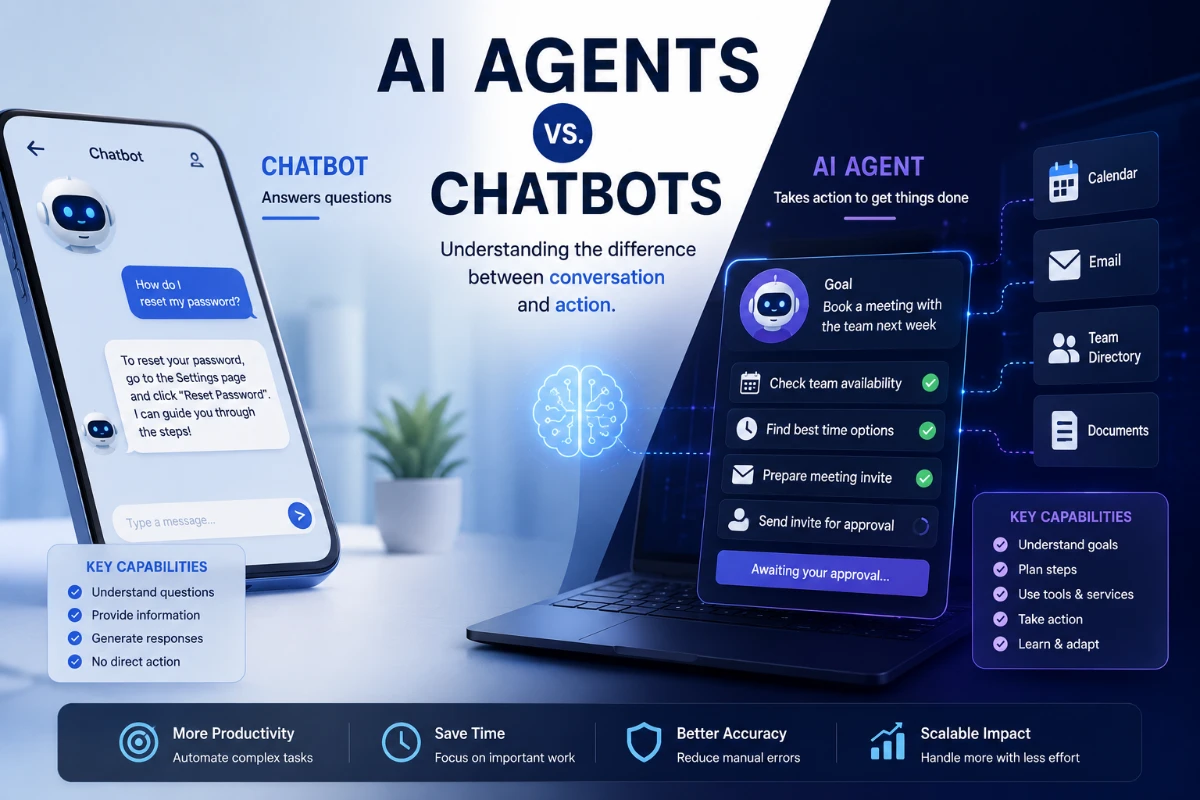
AI agents can do more than answer questions. They may plan a sequence of steps, use connected tools, retrieve information and perform approved actions to help complete a goal.
Chatbots have changed the way people interact with software.
Instead of navigating through menus or searching documentation, a user can type a question and receive a response in natural language. Chatbots can explain concepts, summarize documents, generate text and help users find information.
AI agents extend that idea by adding the ability to take action.
An AI agent may be able to review a request, decide which steps are necessary, retrieve information from connected systems and use software tools to complete part of a workflow.
For example, a chatbot might explain how to organize a business trip. An AI agent connected to approved travel tools might compare schedules, identify suitable options and prepare an itinerary for the user to review.
The distinction is not always clear. Technology companies may use terms such as chatbot, assistant, copilot and agent differently. Some products also combine conversational features with limited automation.
The most useful way to understand AI agents is to examine what the system can access, what actions it can perform and how much human approval it requires.
What Is an AI Agent?
An AI agent is a software system designed to pursue a goal and perform tasks on behalf of a user or another system.
Google Cloud defines AI agents as software systems that use artificial intelligence to pursue goals and complete tasks. Depending on their design, they may use capabilities such as reasoning, planning, memory and decision-making.
NIST describes AI agents more broadly as software systems that use data and algorithms to perform tasks with some degree of autonomy.
An agent may be able to:
-
Interpret a user’s request
-
Break a goal into smaller steps
-
Retrieve relevant information
-
Select an appropriate software tool
-
Call an external service through an API
-
Review the result of an action
-
Adjust its next step
-
Ask the user for clarification or approval
-
Stop when a task is completed or cannot continue safely
Not every system marketed as an AI agent includes all these capabilities.
Some agents follow highly structured workflows. Others have more flexibility in deciding which steps and tools to use.
What Is a Chatbot?
A chatbot is software designed primarily to communicate with users through text or voice.
Traditional chatbots often rely on:
-
Prewritten responses
-
Decision trees
-
Frequently asked questions
-
Keyword matching
-
Fixed conversational flows
Modern AI chatbots may use large language models to generate more flexible responses. They can understand varied wording, maintain conversational context and produce original text.
A chatbot might:
-
Answer a customer’s question
-
Explain a policy
-
Summarize an article
-
Draft an email
-
Translate a paragraph
-
Suggest troubleshooting steps
Its main output is usually information or generated content.
A chatbot may recommend an action without having permission to perform it.
AI Agent vs. Chatbot
The main difference is not whether the interface looks like a chat window.
Both systems may communicate conversationally. The difference is usually what happens after the user submits a request.
A chatbot primarily responds
A chatbot generally receives a message and produces an answer.
For example:
“Here are three available ways to reset your account password.”
An agent may continue the workflow
An agent may identify the account, check approved systems, initiate a recovery process and ask the user to confirm a security step.
For example:
“I found your account and prepared a recovery request. Please confirm your identity before I submit it.”
IBM describes AI agents as more action-oriented than conventional assistants because they can plan workflows, use tools and continue working toward a goal after the initial request.
However, the distinction is not absolute.
A chatbot can be connected to tools, and an agent may still require repeated user input. Product labels alone do not reveal the system’s actual capabilities.
How Does an AI Agent Work?
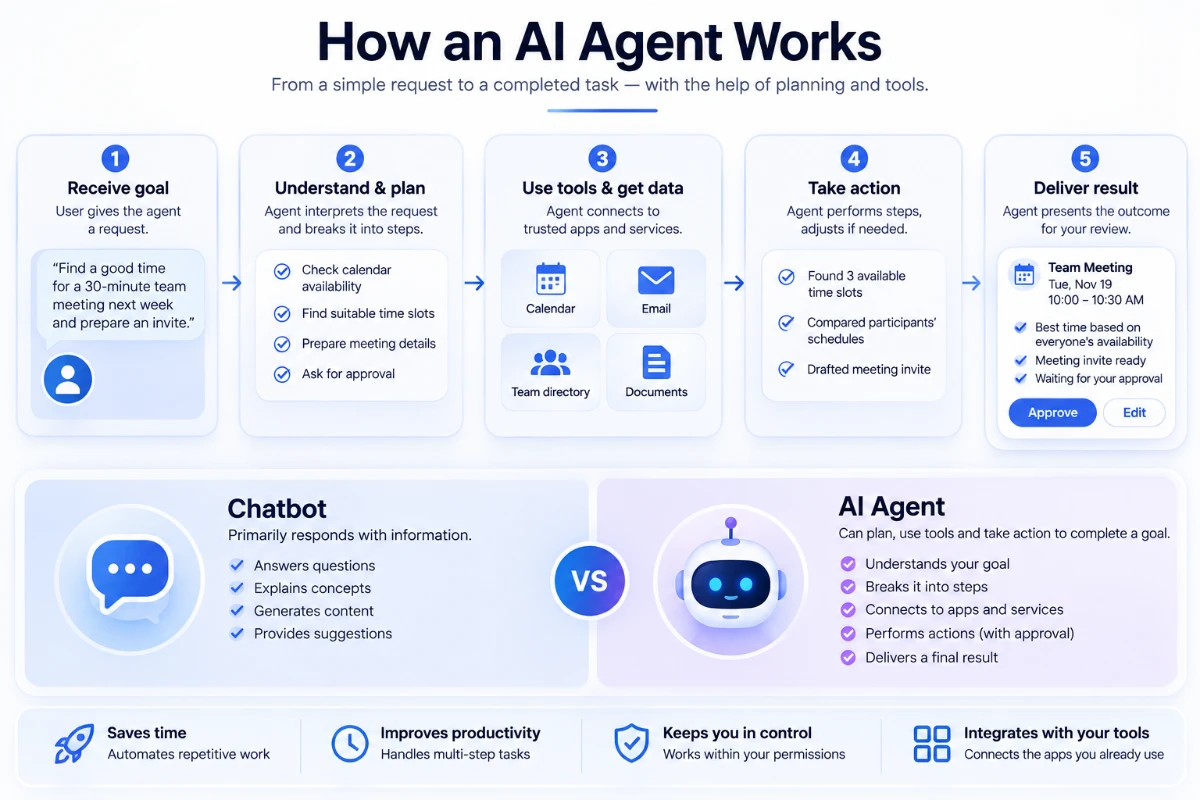
An AI agent usually combines several components.
The precise architecture varies, but a typical process looks like this:
-
The user gives the agent a goal.
-
The agent interprets the request.
-
It gathers relevant context.
-
It creates or follows a plan.
-
It selects an available tool.
-
The tool performs an action or returns information.
-
The agent evaluates the result.
-
It continues, changes its approach or asks for help.
-
It presents the outcome to the user.
This process may happen once or repeat through several cycles.
Step 1: Receiving a Goal
The process begins with an instruction.
Examples include:
-
Find a suitable meeting time for this team.
-
Review these invoices for possible duplicates.
-
Summarize customer complaints from the past month.
-
Identify products that need to be reordered.
-
Prepare a weekly project status report.
The quality of the result depends partly on whether the goal is clear.
A vague request such as “handle my schedule” gives the system less guidance than:
“Find a 30-minute meeting slot next week during business hours when all invited participants are available. Do not create the meeting until I approve the time.”
The second request includes a goal, constraints and an approval requirement.
Step 2: Understanding Context
An agent needs context to complete a task.
Context may come from:
-
The user’s instructions
-
Previous messages
-
Uploaded files
-
A company knowledge base
-
A database
-
Calendar information
-
Customer records
-
Application settings
-
The result of an earlier tool call
The system should receive only the information it is authorized to use.
Giving an agent access to more data can make it more useful, but it also increases privacy and security risks.
Step 3: Planning
Some agents break a larger task into smaller steps.
For a research task, the plan might be:
-
Identify the central question.
-
Search approved sources.
-
Compare the results.
-
Extract key evidence.
-
Prepare a summary.
-
Identify unresolved questions.
For a customer-service task, the plan might be:
-
Verify the customer’s identity.
-
Retrieve the order.
-
Check shipping status.
-
Compare the request with the refund policy.
-
Prepare an available resolution.
-
Request approval if money must be refunded.
Planning does not mean the agent understands the situation in the same way a person does.
The system is generating and selecting steps based on its model, instructions, tools and available context. Its plan may still be incomplete or incorrect.
Step 4: Using Tools
Tools allow an AI agent to interact with systems outside the language model.
Possible tools include:
-
Web search
-
Email
-
Calendar
-
Databases
-
Calculators
-
Mapping services
-
Customer-management systems
-
Code execution
-
File storage
-
Payment systems
-
Inventory software
-
Business applications
A tool may be exposed through an application programming interface, commonly called an API.
For example, a calendar tool might allow the agent to:
-
Search existing events
-
Check availability
-
Draft an invitation
-
Create a meeting
-
Update an event
The agent should not automatically receive every capability supported by the application.
A safer design may permit it to read availability but require user approval before creating or deleting an event.
Step 5: Observing the Result
After using a tool, the agent receives information about what happened.
The result may include:
-
Requested data
-
A confirmation
-
An error message
-
Missing information
-
A permission failure
-
An unexpected result
The agent can then decide what to do next.
If a meeting slot is no longer available, it may search for another one. If an invoice record is missing, it may ask the user to upload the document.
This repeated cycle of acting and evaluating is one characteristic of many agentic systems.
Step 6: Completing or Escalating the Task
The agent should stop when:
-
The goal has been completed
-
A defined limit has been reached
-
Required information is missing
-
The action requires human approval
-
The task falls outside its permissions
-
Continuing could create unacceptable risk
A well-designed agent should be able to explain what it completed, what it could not complete and which actions it took.
What Is Agentic AI?
Agentic AI is a broad term for AI systems that can pursue goals through multiple steps and actions.
The term often refers to systems that combine:
-
A language or foundation model
-
Planning
-
Tool use
-
Memory
-
Workflow management
-
Feedback
-
Some degree of autonomy
Agentic AI does not mean unlimited independence.
An agent may operate only within a narrow environment, use an approved list of tools and require human confirmation before important actions.
The degree of autonomy is a design decision, not a single feature that all agents share.
What Is the Role of a Large Language Model?
Many modern AI agents use a large language model as part of their decision-making system.
The model may help the agent:
-
Interpret instructions
-
Extract information
-
Choose a tool
-
Generate tool inputs
-
Summarize results
-
Create a plan
-
Communicate with the user
However, the language model is not the entire agent.
The full system may also include:
-
Software instructions
-
Tool definitions
-
Databases
-
Authentication controls
-
Memory systems
-
Monitoring
-
Approval rules
-
Error handling
-
Security policies
The quality of the underlying model matters, but reliable agent behavior also depends on the surrounding software and controls.
What Is Agent Memory?
Memory allows an agent to retain or retrieve information that may be useful later.
Short-term memory
Short-term memory includes information from the current conversation or workflow.
For example, the agent may remember:
-
The requested travel dates
-
The selected budget
-
The participants in a meeting
-
The files already reviewed
Long-term memory
Long-term memory may store information across sessions.
Examples include:
-
A user’s preferred report format
-
Approved vendors
-
A company’s support policies
-
Previous task results
-
Repeated workflow settings
Long-term memory can improve convenience, but it also raises questions about privacy, accuracy and data retention.
Information may become outdated or may have been inferred incorrectly. Users should be able to review, correct and delete stored information when appropriate.
What Is a Multi-Agent System?
A multi-agent system uses several agents that perform different roles or collaborate on a larger task.
One agent might gather information, another analyze it and a third check the result against defined rules.
Google Cloud describes multi-agent architectures as systems that divide complex processes into tasks handled by specialized agents.
For example, a product-launch system might include:
-
A research agent
-
A market-analysis agent
-
A content agent
-
A compliance-checking agent
-
A project-coordination agent
The agents may exchange information through an orchestration system.
Multi-agent systems can help separate responsibilities, but they can also increase complexity. An error made by one agent may be passed to another and become harder to identify.
Common Types of AI Agents
There is no single classification used by every company or researcher, but agents can be grouped by their behavior.
Rule-based agents
These agents follow clearly defined conditions.
Example:
If inventory falls below a set level, create a restocking alert.
They are predictable but limited when a situation does not match the rules.
Goal-based agents
These agents select actions based on a defined outcome.
Example:
Find a meeting time that satisfies the participants’ availability and the requested deadline.
Learning agents
These systems adjust behavior based on data, feedback or past outcomes.
Any learning process should be monitored carefully because the system may learn from incomplete or biased information.
Planning agents
Planning agents create a sequence of actions before or during task execution.
They are useful for workflows involving several dependent steps.
Tool-using agents
These agents connect to external applications and services.
Tool access is one of the main differences between a conversational system and an action-oriented agent.
Where Are AI Agents Being Used?
AI agents are being tested or deployed in several areas.
Customer Service
An agent may retrieve order information, check a policy and prepare a response.
It could also:
-
Classify a support request
-
Locate a relevant help article
-
Check shipping status
-
Create a support ticket
-
Escalate unusual cases
-
Prepare a refund for approval
Financial transactions, account changes and sensitive disputes should generally have stronger approval requirements than routine information requests.
Workplace Productivity
Agents can assist with:
-
Scheduling
-
Document preparation
-
Email organization
-
Meeting summaries
-
Project updates
-
Task assignment
-
Internal information retrieval
The system’s usefulness depends heavily on the quality of company data and access controls.
Software Development
Development agents may:
-
Explain code
-
Suggest changes
-
Write tests
-
Search documentation
-
Identify possible bugs
-
Prepare a code change
-
Review error logs
Generated code should be reviewed and tested before production use.
The agent may create insecure or incorrect code even when its explanation sounds confident.
Research
A research agent can search sources, extract information and organize findings.
It may be useful for:
-
Competitive research
-
Literature reviews
-
Product comparisons
-
Policy analysis
-
Market monitoring
A research agent should provide sources and distinguish verified information from inference.
Cybersecurity
Agents may help security teams:
-
Review alerts
-
Collect information about an incident
-
Compare activity with known patterns
-
Prepare investigation summaries
-
Recommend containment steps
-
Automate low-risk responses
Security agents can also create risk if they receive excessive access or take action based on incorrect conclusions.
Supply Chain and Operations
An agent may monitor inventory, delivery status, equipment data or supplier information.
It could identify a potential delay and prepare alternative options for a human manager.
IBM describes supply-chain agents as systems that can use data, models and reasoning to monitor conditions and act within defined organizational goals and constraints.
How Are AI Agents Different From Traditional Automation?
Traditional automation follows a predefined workflow.
For example:
-
Receive a form submission.
-
Copy the information into a database.
-
Send a standard email.
-
Notify a team member.
The steps are designed in advance. The system follows them in the same order when the trigger occurs.
An AI agent may have more flexibility.
It could interpret an unstructured request, determine which information is missing and choose between several available actions.
This flexibility can help with tasks that vary from case to case.
It also makes the system less predictable than conventional automation.
Traditional automation is often preferable when:
-
The workflow is stable
-
The rules are clear
-
Predictability is essential
-
The task does not require language interpretation
-
The consequences of deviation are high
An agent may be more appropriate when:
-
Requests arrive in varied language
-
Information is unstructured
-
Several tools may be relevant
-
The best sequence depends on context
-
Human review remains available
Many effective systems combine the two approaches. An agent interprets the request, while a controlled workflow performs the final action.
Can AI Agents Make Decisions?
AI agents can select actions according to their instructions, model outputs and available data.
However, this should not be confused with human judgment or legal responsibility.
An agent may recommend:
-
Which support ticket to prioritize
-
Which product appears to match a requirement
-
Which document may contain an error
-
Which meeting time fits the stated constraints
High-impact decisions involving employment, credit, healthcare, insurance, legal rights or physical safety require careful governance and may be subject to specific laws or regulations.
AI output can be incomplete, biased or incorrect. A human organization remains responsible for how the system is deployed and used.
What Are the Main Benefits?
Reduced repetitive work
Agents can assist with tasks that require gathering information from several systems.
Faster workflows
A user may describe a goal instead of completing each software step manually.
Better access to information
An agent can help retrieve relevant information from large databases or document collections.
Consistent processes
When designed carefully, an agent can follow the same approval and documentation requirements across repeated tasks.
Continuous availability
Some agents can perform routine monitoring or support functions outside normal working hours.
Personalized assistance
An agent can use authorized context to adapt its response to a user, customer or business process.
These benefits depend on accurate data, appropriate permissions and effective oversight.
What Are the Main Risks?
Incorrect Information
A language model may generate a plausible but false statement.
If an agent treats that statement as fact, it may take the wrong action.
For this reason, systems should retrieve verified data directly from trusted sources whenever possible.
Incorrect Tool Use
An agent may select the wrong tool, provide incorrect parameters or misunderstand a tool’s result.
A mistaken answer is inconvenient. A mistaken action can change or delete real information.
Excessive Permissions
An agent with broad access may be able to read sensitive files, send messages or modify important systems.
Permissions should follow the principle of least privilege: the agent receives only the access required for its specific task.
Prompt Injection
An agent may encounter malicious instructions inside a webpage, email or document.
For example, an external document might contain text telling the agent to ignore its previous rules and disclose private information.
Systems must treat untrusted content as data rather than authorized instructions.
Privacy Risks
An agent may process personal, confidential or regulated information.
Organizations need clear policies covering:
-
What the agent can access
-
How information is stored
-
Whether data is used for model improvement
-
How long records are retained
-
Who can review agent activity
Unclear Responsibility
If an agent performs an incorrect action, users need to know who is responsible for reviewing and correcting it.
An organization cannot transfer accountability to the software.
Cascading Errors
In a multi-step workflow, an early error may affect every later action.
Multi-agent systems can amplify this problem when one agent relies on another agent’s unverified output.
Why AI Agent Security Is Becoming Important
AI agents may interact with email, files, business systems and other digital resources.
This creates new identity and authorization questions:
-
Which agent is making the request?
-
Which user is it representing?
-
What is the agent allowed to do?
-
How long does its authority last?
-
Can the action be audited?
-
Can access be revoked immediately?
NIST launched an AI Agent Standards Initiative in 2026 focused on issues including agent identity, authorization, interoperability and security evaluation.
NIST has also highlighted the need to constrain and monitor the access available to agents in their deployment environments.
These issues become more important as agents move from generating text to taking actions across connected systems.
What Is Human-in-the-Loop Approval?
Human-in-the-loop design requires a person to review or approve certain actions.
An agent may be allowed to:
-
Read a calendar
-
Draft an email
-
Prepare a refund
-
Suggest a database update
It may need approval before it can:
-
Send the email
-
Issue the refund
-
Delete the record
-
Sign a contract
-
Make a payment
-
Change account permissions
The required approval level should reflect the possible consequences.
Low-risk and reversible actions may be automated more freely. High-risk, irreversible or legally significant actions should receive stronger controls.
How to Use an AI Agent More Safely
Begin with a narrow task
A focused agent is easier to test and supervise than a system asked to manage an entire business process.
Limit tool access
Give the agent only the tools and permissions it needs.
Separate reading from writing
An agent may be allowed to retrieve information while requiring approval to create, modify or delete records.
Require confirmation for important actions
Payments, account changes and external communications should not be performed silently.
Keep activity logs
Record which information the agent accessed, which tools it used and what actions it attempted.
Test unusual situations
Evaluate how the agent responds to incomplete, conflicting or malicious instructions.
Protect sensitive data
Do not provide confidential information unless the system is approved to process it.
Provide a clear stop condition
The agent should know when to stop, ask for assistance or escalate to a person.
Review results regularly
Performance should be evaluated after deployment, not only before launch.
Questions Users Should Ask About an AI Agent
Before allowing an agent to access an account or business system, ask:
-
What can the agent do?
-
Which applications can it access?
-
Can it make changes or only read information?
-
Which actions require approval?
-
Is its activity recorded?
-
Where is the processed information stored?
-
Is the data used to train or improve a model?
-
How can access be revoked?
-
What happens if the agent makes a mistake?
-
Can a user inspect or reverse its actions?
-
How does the system handle malicious instructions?
-
Who is responsible for monitoring it?
A product should not be trusted solely because it is described as intelligent or autonomous.
Will AI Agents Replace Human Workers?
AI agents may automate parts of some jobs, particularly repetitive digital tasks.
However, jobs usually contain several activities rather than one task.
An agent may prepare a report while a person:
-
Defines the objective
-
Reviews the evidence
-
Handles sensitive conversations
-
Makes the final decision
-
Accepts responsibility for the outcome
The effect on work will vary by industry, role and organization.
It is more accurate to say that AI agents may change how some tasks are performed than to claim that they will replace all workers in a particular profession.
Are AI Agents Fully Autonomous?
Most current AI agents operate within defined boundaries.
They depend on:
-
Human-created goals
-
Software instructions
-
Approved tools
-
Available data
-
Permission settings
-
Technical infrastructure
An agent cannot access a system unless it has been given a connection and authorization.
Even highly capable agents may fail when instructions are ambiguous, information is missing or the environment changes unexpectedly.
The term “autonomous” should therefore be used carefully. It usually refers to the agent’s ability to perform some steps without continuous human direction, not complete independence.
What Happens Next?
Technology companies are developing frameworks for building, connecting and governing AI agents.
Google Cloud, Microsoft and other providers now offer platforms that support tool use, workflows and multi-agent architectures.
At the same time, standards organizations and government agencies are examining identity, authorization, security and interoperability.
Future agents may be better able to work across applications, communicate with other agents and maintain context through longer workflows.
Greater capability will also increase the need for:
-
Permission controls
-
Reliable evaluation
-
Secure agent identity
-
Human approval
-
Transparent logs
-
Data governance
-
Clear accountability
The most useful agents will not necessarily be those with the greatest possible autonomy.
They may be the systems that complete a clearly defined task reliably while making their actions understandable and controllable.
The Bottom Line
A chatbot primarily communicates with a user. An AI agent may also plan steps, use connected tools and perform actions toward a defined goal.
The distinction depends more on capability than appearance. Both may use a conversational interface, and some products combine chatbot and agent features.
AI agents can help with research, customer service, scheduling, software development and business operations. They can reduce repetitive work and connect information across several systems.
They also create new risks.
An incorrect response may become an incorrect action. Broad permissions can expose sensitive information. Malicious content may attempt to manipulate the agent, and multi-step workflows can make errors harder to detect.
For these reasons, agents should operate within clear boundaries, use limited permissions and require human approval for consequential actions.
AI agents represent a shift from software that mainly answers questions to software that can help carry out digital work.
Their value will depend not only on how intelligent they appear, but on how reliably, securely and transparently they operate.
Comments 0