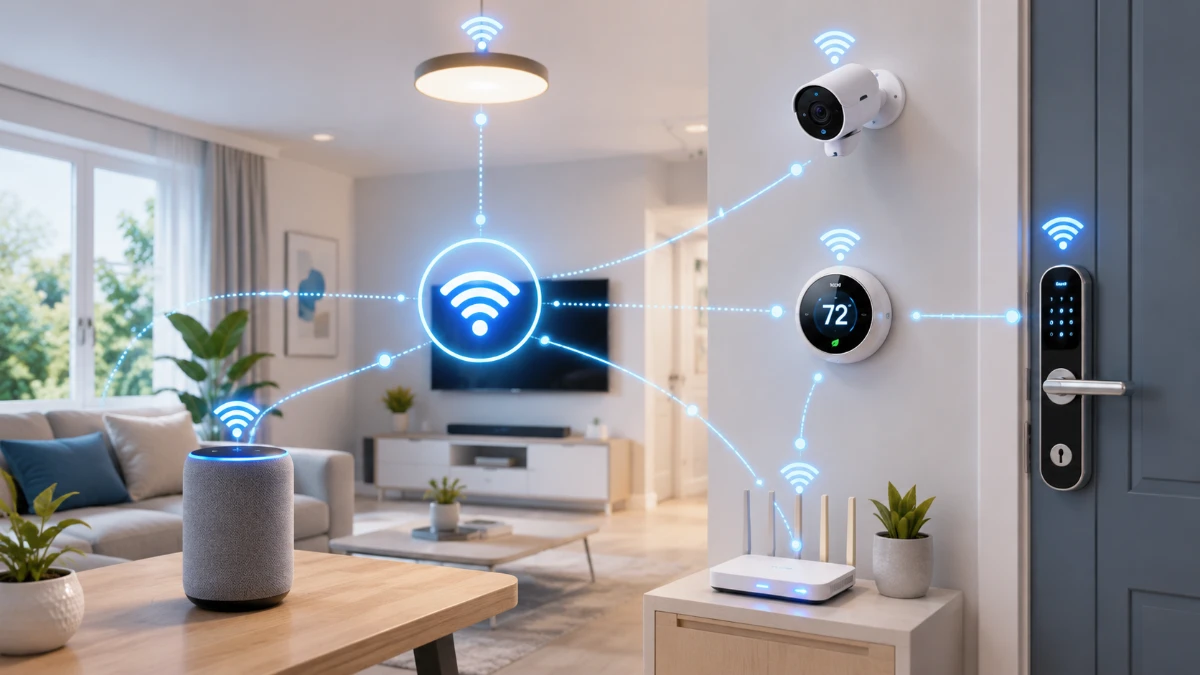
Smart lights, locks, cameras and thermostats may use Wi-Fi, Bluetooth, Thread or Zigbee to exchange information. Standards such as Matter can then help compatible products understand the same commands across different smart home platforms.
A modern smart home may contain dozens of connected products.
A motion sensor can turn on a hallway light. A smart lock can notify a phone when someone enters. A thermostat can adjust the temperature when the house becomes empty. A voice assistant may control devices made by several different companies.
These actions can look simple from the user’s perspective, but several technologies may be involved behind the scenes.
A smart device needs a way to connect to other equipment. It needs a common language for exchanging commands. It may also depend on a hub, border router, mobile application or cloud service to coordinate everything.
This is why two products described as “smart” do not necessarily work together automatically.
Understanding the basic layers of smart home communication can make it easier to choose compatible devices, improve reliability and protect household privacy.
What Is a Smart Home Device?
A smart home device is an electronic product that can communicate with another device, application or online service.
Common examples include:
-
Light bulbs and switches
-
Thermostats
-
Door locks
-
Security cameras
-
Video doorbells
-
Motion and contact sensors
-
Smart plugs
-
Speakers
-
Televisions
-
Appliances
-
Smoke and carbon-monoxide alarms
-
Garage-door controllers
-
Robot vacuums
Some products connect directly to a home Wi-Fi network. Others communicate through Bluetooth, Thread, Zigbee or another low-power technology.
A device may also connect to a hub, which then connects to the home network and internet.
The word “smart” does not describe one specific communication method. It generally means that the product contains software and can exchange information or respond to automated commands.
The Three Layers of Smart Home Communication
It is useful to think of a smart home as having three basic layers.
1. The network connection
This is the technology that physically or wirelessly carries information.
Examples include:
-
Wi-Fi
-
Ethernet
-
Bluetooth
-
Thread
-
Zigbee
2. The communication standard
This determines how compatible devices describe themselves and interpret commands.
Matter is one example. It provides an application layer that allows supported smart home products to exchange standardized commands over Internet Protocol networks.
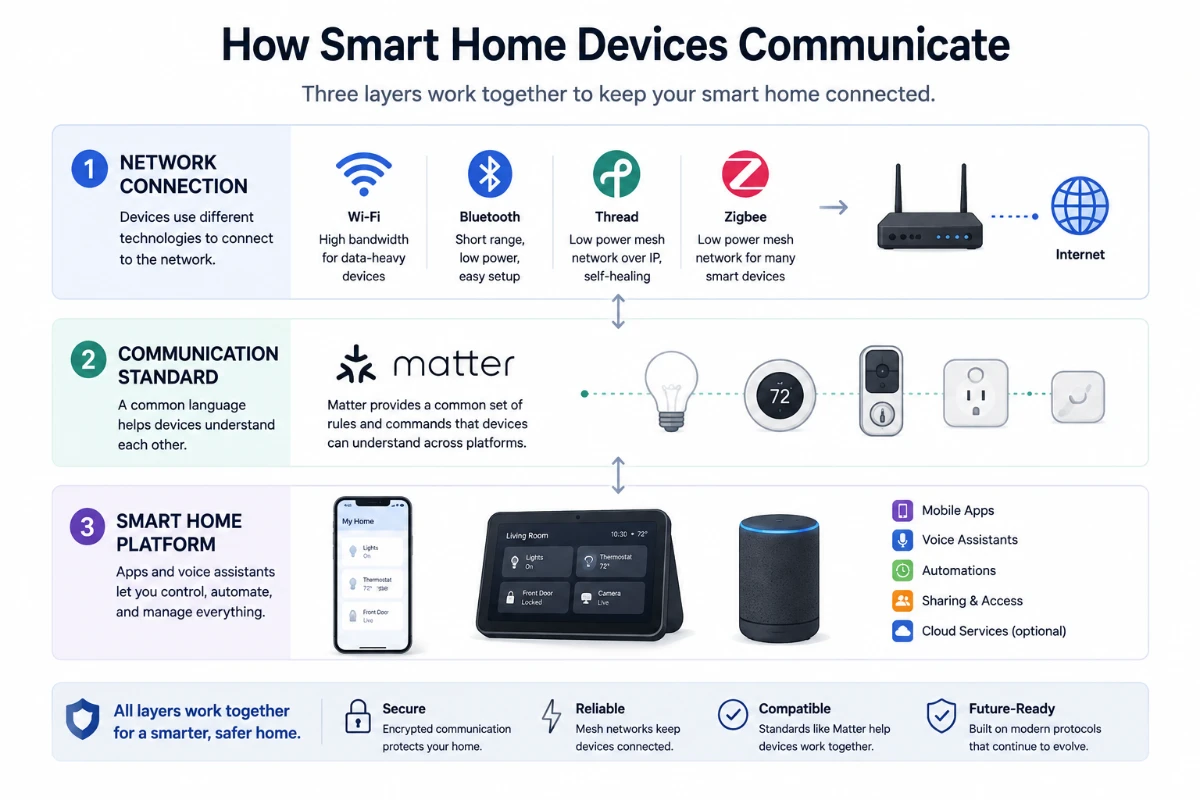
3. The smart home platform
This is the application or ecosystem a person uses to set up, control and automate devices.
A platform may provide:
-
A mobile application
-
Voice control
-
User accounts
-
Automation rules
-
Remote access
-
Notifications
-
Device sharing
-
Cloud services
These three layers may come from different organizations.
For example, a smart light might use Thread for networking, Matter for standardized device communication and a separate smart home platform for its user interface and automations.
How Wi-Fi Connects Smart Home Devices
Wi-Fi allows devices to connect to a wireless local network through a router or access point.
A Wi-Fi smart device usually receives an address on the home network. It can then communicate with a phone, local controller or cloud service.
Wi-Fi is widely used because most homes already have a wireless router, and phones and computers can connect to the same network without additional equipment.
The Wi-Fi Alliance describes Wi-Fi as an interoperable foundation connecting smartphones, access points and connected objects throughout the home.
Wi-Fi is commonly used for devices that transmit relatively large amounts of information, including:
-
Security cameras
-
Video doorbells
-
Smart televisions
-
Speakers
-
Displays
-
Appliances
-
Hubs and controllers
A camera may need Wi-Fi because video requires much more network capacity than a door sensor sending a simple open-or-closed status.
Advantages of Wi-Fi
Existing household infrastructure
Most households already operate a Wi-Fi network, so a new device may not require a separate hub.
Higher data capacity
Wi-Fi is well suited to audio, video, software downloads and other data-intensive tasks.
Direct internet access
A Wi-Fi device can often connect directly to an online service through the router.
Familiar setup
Users are generally accustomed to selecting a Wi-Fi network and entering its password.
Limitations of Wi-Fi
Power consumption
A constantly active Wi-Fi connection can require more energy than technologies designed specifically for small battery-powered sensors.
Network congestion
A home containing many devices may experience connection problems if its router, coverage or network configuration is inadequate.
Dependence on the router
When the router is offline, devices relying entirely on Wi-Fi may lose some or all communication capabilities.
Setup difficulties
Some devices support only certain frequency bands or require a phone to be connected to the same local network during installation.
Newer Wi-Fi generations can improve capacity, latency and reliability, but every device and router must support the relevant technology to receive those benefits.
How Bluetooth Is Used in Smart Homes
Bluetooth is a short-range wireless technology commonly built into phones, tablets, computers and many connected products.
In smart homes, Bluetooth is frequently used during setup.
A phone may establish a temporary Bluetooth connection to a new device so the user can:
-
Identify it
-
Provide network credentials
-
Confirm ownership
-
Select settings
-
Add it to a smart home platform
After setup, the product may continue using Bluetooth or switch to Wi-Fi, Thread or another network.
Bluetooth can also support direct control of products such as:
-
Smart locks
-
Light bulbs
-
Speakers
-
Sensors
-
Appliances
-
Remote controls
Bluetooth Low Energy is designed for applications that need to exchange smaller amounts of information while using relatively little power. This can make it appropriate for battery-operated products.
Advantages of Bluetooth
Nearly universal phone support
Most modern smartphones can communicate with Bluetooth devices without an additional accessory.
Low-power operation
Bluetooth Low Energy can support products that must operate for long periods on batteries.
Direct local connection
A phone can sometimes control a nearby device without sending the command through the internet.
Convenient setup
Bluetooth is commonly used to discover and configure a product before it joins another network.
Limitations of Bluetooth
Shorter practical range
Walls, building materials, interference and device design can affect the connection.
Limited remote access
A phone normally cannot communicate directly with a Bluetooth device after leaving the home.
Remote access may require a hub or another device that remains connected.
Point-to-point behavior
Some Bluetooth products are designed primarily for direct communication rather than whole-home networking.
Bluetooth mesh technology also exists, but consumers should not assume that every Bluetooth product supports mesh networking.
What Is Thread?
Thread is a low-power, IP-based wireless mesh networking protocol designed for connected devices in homes and buildings.
It is intended for products that need reliable communication but do not require the bandwidth of Wi-Fi.
The Thread Group describes Thread as an open, secure and low-power mesh network designed specifically for smart home applications.
Thread is commonly associated with devices such as:
-
Door and window sensors
-
Motion sensors
-
Smart plugs
-
Light switches
-
Thermostats
-
Door locks
-
Smart blinds
-
Environmental sensors
Because Thread uses Internet Protocol, compatible devices can participate in an IP-based network without each one connecting directly to the Wi-Fi router.
How a Thread Mesh Network Works
In a traditional hub-and-spoke network, every device communicates through one central point.
Thread uses a mesh design.
Compatible powered devices can pass messages for other devices, creating multiple possible routes across the network.
For example:
-
A door sensor sends a status update.
-
A nearby smart plug forwards it.
-
A light switch passes it farther across the home.
-
The message reaches a Thread border router.
-
The border router connects the Thread network to the rest of the home’s IP network.
If one possible route becomes unavailable, the network may use another route.
The Thread Group describes Thread networks as self-healing and designed without a single point of failure within the mesh itself.
This does not mean every Thread installation is immune to failure. Power outages, radio interference, defective devices or an unavailable border router can still affect service.
What Is a Thread Border Router?
A Thread border router connects the Thread mesh network to other IP networks, such as Ethernet or Wi-Fi.
It allows information to move between Thread devices and smart home controllers, phones or other services.
A border router may be built into:
-
A smart speaker
-
A smart display
-
A Wi-Fi router
-
A streaming device
-
A dedicated hub
The border router is not necessarily the main decision-maker for the smart home. Its primary networking role is to connect the Thread network to the broader IP network.
A home may contain more than one Thread border router, which can improve coverage and resilience when the implementation supports them correctly.
Is Thread the Same as Matter?
No.
Thread is a network technology. It carries information between devices.
Matter is an application-layer standard. It defines how compatible devices identify themselves and exchange smart home commands over IP networks.
A simple comparison is:
-
Thread provides the road.
-
Matter provides the shared traffic rules and language.
Matter can operate over Thread, Wi-Fi and Ethernet. Bluetooth Low Energy is also commonly used during the commissioning process for adding a Matter product to a smart home system.
A product can support Thread without supporting Matter. A Matter product can also use Wi-Fi rather than Thread.
Consumers should therefore check both the networking technology and the supported smart home standard.
What Is Matter?
Matter is a smart home interoperability standard developed through the Connectivity Standards Alliance.
Its purpose is to make supported devices more consistent to set up and use across participating ecosystems.
The standard defines common ways to represent and control supported product types. This can allow a certified device to work with multiple compatible smart home platforms without each company developing an entirely separate connection for every ecosystem.
Matter does not replace Wi-Fi, Thread or Ethernet. It operates over those IP-based networks.
It also does not replace a smart home platform. The platform still provides its application, voice assistant, automation tools and user experience. The Connectivity Standards Alliance explicitly notes that Matter does not replace an existing smart home platform.
What Does the Matter Logo Mean?
A Matter logo indicates that the product has completed the relevant Matter certification process.
It suggests that the device uses the standard and supports defined interoperability requirements.
However, the logo does not mean that every possible feature will work identically in every application.
A device manufacturer may offer additional functions through its own app. Another smart home platform may support only the standard Matter features available for that device type.
Before purchasing a product, users should check:
-
Whether the exact device is Matter certified
-
Which Matter device type it supports
-
Whether their preferred platform supports that device category
-
Whether advanced features require the manufacturer’s app
-
Whether a compatible controller or Thread border router is needed
Matter improves compatibility, but it does not make every smart home product functionally identical.
What Is Zigbee?
Zigbee is another low-power wireless mesh technology used by many smart home products.
It has been widely used for:
-
Smart bulbs
-
Sensors
-
Switches
-
Plugs
-
Locks
-
Energy-management devices
A typical Zigbee smart home includes a coordinator or hub. Devices communicate through the Zigbee mesh, while the hub connects that network to an application or internet service.
Like Thread, powered Zigbee devices may relay messages and expand mesh coverage.
However, Zigbee and Thread are different technologies. A Zigbee product cannot join a Thread network simply because both use mesh networking.
Some modern hubs support several communication technologies, allowing one controller to manage Zigbee, Thread, Wi-Fi and Matter products.
Why Do Some Smart Home Devices Need a Hub?
A hub acts as an intermediary between devices and the broader home network.
It may perform several functions:
-
Connect low-power devices to Wi-Fi or Ethernet
-
Translate between communication protocols
-
Store automation rules
-
Provide remote access
-
Coordinate devices
-
Process commands locally
-
Manage firmware updates
-
Send notifications
A Zigbee device commonly requires a compatible Zigbee hub.
A Thread product requires access to a Thread border router to communicate with the broader IP network, although that border router may already be built into another device.
Some Wi-Fi devices do not require a separate hub because they connect directly to the router.
“No hub required” is not always automatically better. A dedicated hub can reduce the number of devices directly using Wi-Fi and may allow automations to run locally.
What Is Local Control?
Local control means that a command is processed within the home instead of depending entirely on a remote cloud service.
For example:
-
A motion sensor detects movement.
-
A local controller evaluates an automation rule.
-
A smart light turns on.
The command can potentially complete without leaving the home network.
Local control can provide:
-
Faster responses
-
Continued operation during internet outages
-
Reduced dependence on an external service
-
Less transmission of household activity data
-
More predictable automation
However, a locally controlled device may still use the cloud for:
-
Remote access
-
Notifications
-
Software updates
-
Voice processing
-
Data backup
-
Account management
-
Advanced analytics
Whether a smart home works without the internet depends on the particular products and platform configuration.
Why Do Some Devices Depend on the Cloud?
Cloud services make it easier for a user to control a home from outside the local network.
When a person taps an application while away from home, the process may look like this:
-
The phone sends a command to the provider’s cloud.
-
The cloud authenticates the account.
-
The service sends the instruction to the home device or hub.
-
The device completes the action.
-
A result is returned to the application.
Cloud platforms can also support:
-
Video storage
-
Voice recognition
-
AI analysis
-
User accounts
-
Device sharing
-
Activity history
-
Subscription services
-
Integration with third-party applications
The tradeoff is dependency.
If the internet connection or provider’s service is unavailable, cloud-dependent functions may stop working.
The provider may also collect metadata or device information according to its privacy policy.
How Smart Home Automations Work
An automation generally contains three elements.
Trigger
The event that starts the automation.
Examples:
-
Motion is detected.
-
A door opens.
-
The time reaches 7 p.m.
-
The indoor temperature rises.
-
A person arrives home.
Condition
An optional requirement that must be true.
Examples:
-
Nobody is already home.
-
It is after sunset.
-
The alarm system is armed.
-
The temperature is above a selected level.
Action
The command performed by the system.
Examples:
-
Turn on a light.
-
Lock the door.
-
Adjust the thermostat.
-
Send a notification.
-
Start a camera recording.
These steps may be processed by a hub, mobile application, cloud platform or local smart home controller.
When several manufacturers are involved, the platform must understand the status and commands supported by each device.
Standards such as Matter are intended to make this communication more consistent for supported device categories.
Why Smart Home Devices Sometimes Respond Slowly
A delayed response can have several possible causes.
Weak wireless coverage
The device may be too far from the router, hub or another mesh device.
Network congestion
Many devices may be competing for the same wireless capacity.
Cloud delay
A command may need to travel to an external server and return.
Sleeping battery devices
To conserve energy, some sensors remain inactive until they need to report an event.
Overloaded router or hub
Older networking hardware may struggle with many active devices.
Radio interference
Nearby networks, appliances and building materials can affect wireless communication.
Platform problems
The smart home application or cloud service may be experiencing an outage.
The correct solution depends on which connection layer is failing.
Adding a Wi-Fi extender will not necessarily improve a Zigbee or Thread mesh. Similarly, adding a Thread router will not improve a Wi-Fi camera’s connection.
How to Improve Smart Home Reliability
Use appropriate technology for each device
Cameras and displays may benefit from Wi-Fi, while small sensors may be better suited to Thread, Zigbee or Bluetooth Low Energy.
Position networking equipment carefully
Place the Wi-Fi router or access points in open, central locations when possible.
Expand mesh networks correctly
Powered Thread or Zigbee devices may strengthen their corresponding mesh, but battery-operated sensors often do not relay messages.
Avoid overcrowding one router
A large smart home may benefit from newer networking equipment or several wired access points.
Keep firmware updated
Manufacturers may release security, compatibility and stability improvements.
Prefer local automations for essential tasks
Lighting, locks and safety-related automations may be more reliable when they can run without a cloud round trip.
Check compatibility before purchasing
Confirm the required protocol, hub, border router, application and platform.
Avoid unnecessary platform complexity
Using too many unrelated hubs and applications can make troubleshooting more difficult.
How to Protect a Smart Home Network
Smart home devices can create security and privacy risks because they may collect information about household activity.
A camera may capture video. A lock records entry events. A thermostat can reveal occupancy patterns.
Users should take several basic precautions.
Secure the Wi-Fi network
Use modern encryption supported by the router and a strong, unique network password.
Protect platform accounts
Use a unique password or passkey and enable multifactor authentication when available.
Install software updates
Keep routers, hubs, applications and smart devices current.
Remove unused devices
Reset and disconnect products that are no longer needed.
Review sharing permissions
Remove former residents, guests or service providers who should no longer have access.
Check privacy settings
Understand whether recordings, voice commands or activity history are stored locally or in the cloud.
Separate unfamiliar devices when appropriate
Some users place smart home products on a guest or dedicated network, provided the network configuration still allows required local communication.
Buy supported products
A device with no clear update policy may become a long-term risk.
Do Smart Home Devices Still Work When the Internet Goes Down?
Some do, and some do not.
A local light switch may continue controlling a connected bulb. A locally stored automation may continue running. Bluetooth control may work when the phone is nearby.
Functions more likely to stop include:
-
Remote access
-
Cloud video recording
-
External notifications
-
Cloud voice processing
-
Online weather information
-
Integrations hosted by third parties
A device may also behave differently if the internet is available but the manufacturer’s cloud service is offline.
Users who need essential functions to remain available should look for products and platforms that explicitly support local control.
Can Devices From Different Companies Work Together?
They can, but compatibility must be checked.
Two Wi-Fi products are not automatically compatible simply because they use the same network.
They still need a shared communication standard, platform integration or cloud-to-cloud connection.
Matter is intended to simplify this for supported products by creating a common application layer over IP networks.
Older products may instead depend on:
-
A shared smart home platform
-
A manufacturer integration
-
A compatible hub
-
A cloud service
-
A third-party automation platform
Compatibility may also change if a company ends support for a product or integration.
What to Check Before Buying a Smart Home Device
Before purchasing, check the following:
-
Which network technology does it use?
-
Does it require Wi-Fi, Bluetooth, Thread or Zigbee?
-
Does it need a hub or Thread border router?
-
Is it compatible with the preferred smart home platform?
-
Does it carry a relevant certification?
-
Can its main functions work locally?
-
What happens during an internet outage?
-
Does remote access require a subscription?
-
How long does the manufacturer promise software support?
-
Where is household data stored?
-
Can recordings or history be deleted?
-
Can the product be reset before resale?
-
Do advanced features require the manufacturer’s application?
-
Will every household member be able to control it?
Checking these details can prevent a device from becoming isolated in an incompatible ecosystem.
Common Smart Home Communication Myths
“Every smart device uses Wi-Fi”
Many products use Bluetooth, Thread, Zigbee or proprietary connections.
“Matter is a new wireless network”
Matter is an application-layer standard. It commonly operates over Wi-Fi, Thread or Ethernet.
“Thread and Matter are the same thing”
Thread carries information. Matter helps compatible products interpret standardized commands.
“Mesh means every device extends the network”
Only devices designed to route traffic extend a mesh. Many battery-powered sensors do not.
“No hub required is always better”
A hub can provide local processing, connect low-power devices and reduce direct Wi-Fi usage.
“If the internet is down, the entire smart home stops”
Some local devices and automations may continue working, while cloud-dependent functions may become unavailable.
“The Matter logo guarantees every feature works everywhere”
Certification improves interoperability, but platform support and manufacturer-specific functions can still differ.
The Bottom Line
Smart home devices communicate through several overlapping technologies.
Wi-Fi provides familiar, high-capacity network access for products such as cameras and displays. Bluetooth is useful for short-range control and device setup. Thread and Zigbee provide low-power mesh networking for sensors, switches, locks and other connected products.
Matter sits at a different layer. It gives compatible devices a standardized way to exchange commands over IP-based networks such as Wi-Fi, Thread and Ethernet.
A smart home platform then provides the application, automations, accounts and remote-control experience.
Understanding these differences can make a smart home easier to build and maintain.
Before purchasing a product, users should check its network technology, required hub, platform compatibility, local-control capabilities and software-support policy.
The best smart home is not necessarily the one with the largest number of connected products. It is the one in which devices communicate reliably, remain secure and continue performing their essential functions when users need them.
Comments 0