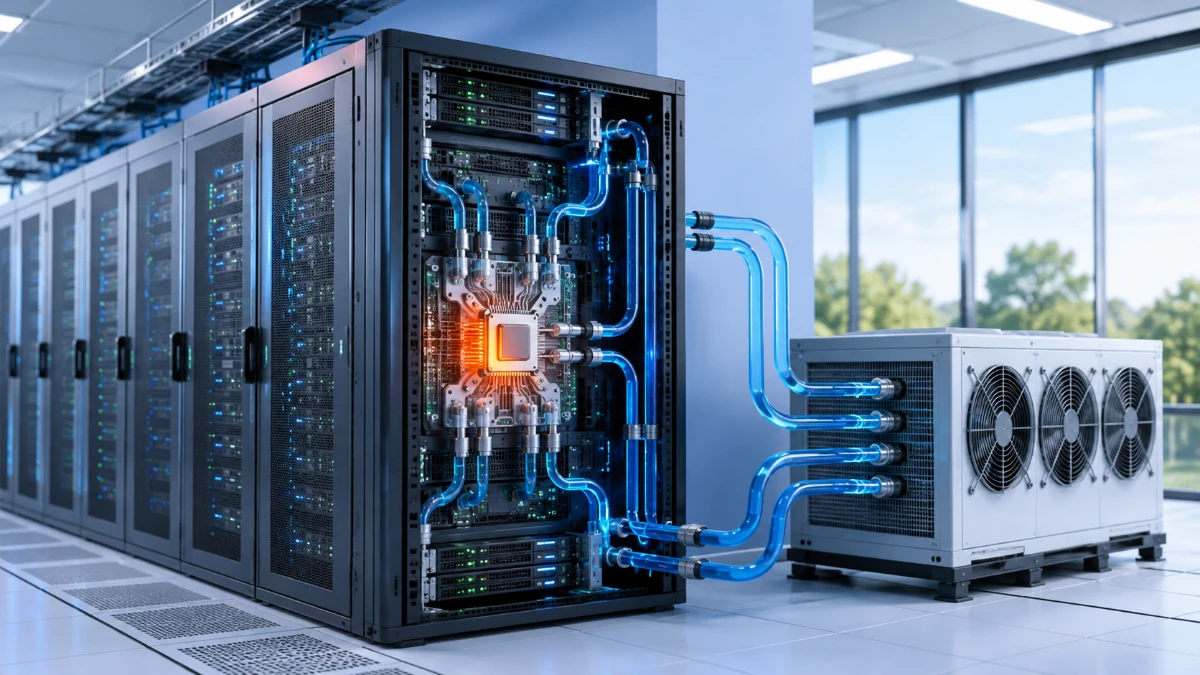
As artificial intelligence and high-performance computing place more powerful processors inside each server rack, data-center operators are turning to liquid cooling to remove heat more efficiently than traditional air-based systems can manage alone.
Modern data centers contain thousands of processors working continuously to store information, run cloud applications and support artificial intelligence.
Every calculation performed by a processor consumes electricity. A significant portion of that electrical energy eventually becomes heat.
If the heat is not removed effectively, computer components may reduce their performance, become less reliable or shut down to protect themselves. Data centers therefore require cooling systems that operate around the clock.
For decades, most facilities have relied primarily on air cooling. Fans move cool air through server racks and carry warm air away from the equipment.
Air cooling remains suitable for many conventional computing environments. However, the rapid growth of artificial intelligence and high-performance computing is increasing the amount of electrical power—and therefore heat—concentrated inside individual racks.
To manage these higher-density systems, data-center operators are increasingly using liquid cooling. Instead of depending entirely on air, these systems bring a cooling fluid much closer to the processors producing the most heat.
Liquid cooling is not a single technology, and it does not mean filling an entire data center with water. It includes several approaches that differ in design, cost and complexity.
Why Do Data Centers Produce So Much Heat?
Servers use processors, memory, storage systems and networking equipment to perform digital work.
These components resist the flow of electricity. During operation, part of the electrical energy supplied to them is released as heat.
A personal computer may remove that heat with a small fan and heat sink. A data center must cool thousands of devices operating in the same building, often at high utilization for long periods.
The amount of heat becomes especially challenging when powerful processors are installed close together.
A traditional server rack might contain general-purpose business equipment. A modern AI rack can contain multiple high-performance processors connected through fast networking systems.
This equipment can perform far more calculations, but it also creates much more heat within a limited physical space.
The issue is therefore not only the total amount of heat produced across a building. It is also heat density—the amount of heat concentrated in each rack, server or processor.
How Traditional Air Cooling Works
Most air-cooled data centers use a combination of fans, air-conditioning equipment and carefully designed airflow paths.
Cool air is delivered toward the front of the server racks. Fans inside the servers pull that air across hot components before releasing warmer air from the back.
The facility then removes heat from the warm air and circulates it again or replaces it with cooler outside air when conditions allow.
Many data centers arrange racks in alternating rows:
-
Cold aisles face the air intakes at the front of the servers.
-
Hot aisles collect warm air leaving the back of the equipment.
-
Barriers or containment systems prevent the two air streams from mixing.
This approach can cool conventional server environments effectively when airflow is properly managed.
The U.S. Department of Energy recommends practices such as separating hot and cold air, sealing unused rack openings and controlling fan speeds as part of energy-efficient data-center design.
However, air has physical limitations. Moving more heat generally requires moving larger volumes of air, increasing fan energy, ducting requirements and noise.
At some point, adding more fans or colder air may become inefficient or impractical.
Why AI Is Changing Data-Center Cooling
Artificial intelligence is accelerating the shift toward higher-density computing.
Training an advanced AI model can require large groups of graphics processors or other specialized accelerators. These processors must communicate rapidly, which encourages companies to place them close together.
AI inference—the process of running a trained model to answer questions or perform tasks—can also create sustained workloads when a service supports large numbers of users.
The result is more computing power packed into each rack.
Some current rack-scale AI systems are designed around full liquid cooling because their processors and interconnections operate at power levels that are difficult to support with conventional air cooling alone. For example, NVIDIA describes its GB300 NVL72 as a fully liquid-cooled rack-scale system integrating 72 GPUs and 36 CPUs.
That example does not mean every AI server requires liquid cooling. Smaller systems and less demanding workloads may continue to operate effectively with air.
The choice depends on processor power, rack density, building design, climate and operating requirements.
Why Liquid Can Remove Heat More Effectively Than Air
Liquids can absorb and transport much more heat than the same volume of air.
This means a liquid-cooling system can carry heat away from a processor using smaller pipes than the large air channels that would be needed to move an equivalent amount of heat.
Liquid cooling can also collect heat closer to where it is produced.
In an air-cooled system, heat must travel through several stages:
-
From the processor into a heat sink.
-
From the heat sink into the surrounding air.
-
Through the server and into the room.
-
From the room air into the facility’s cooling equipment.
A direct liquid-cooling system may place a metal cooling plate directly against the processor. Fluid passing through the plate absorbs the heat before it reaches the room.
This does not eliminate every need for air cooling. Memory, storage, networking equipment and power components may still require airflow.
However, removing the hottest processor loads through liquid can substantially reduce the burden placed on the room’s air system.
What Is Direct-to-Chip Liquid Cooling?
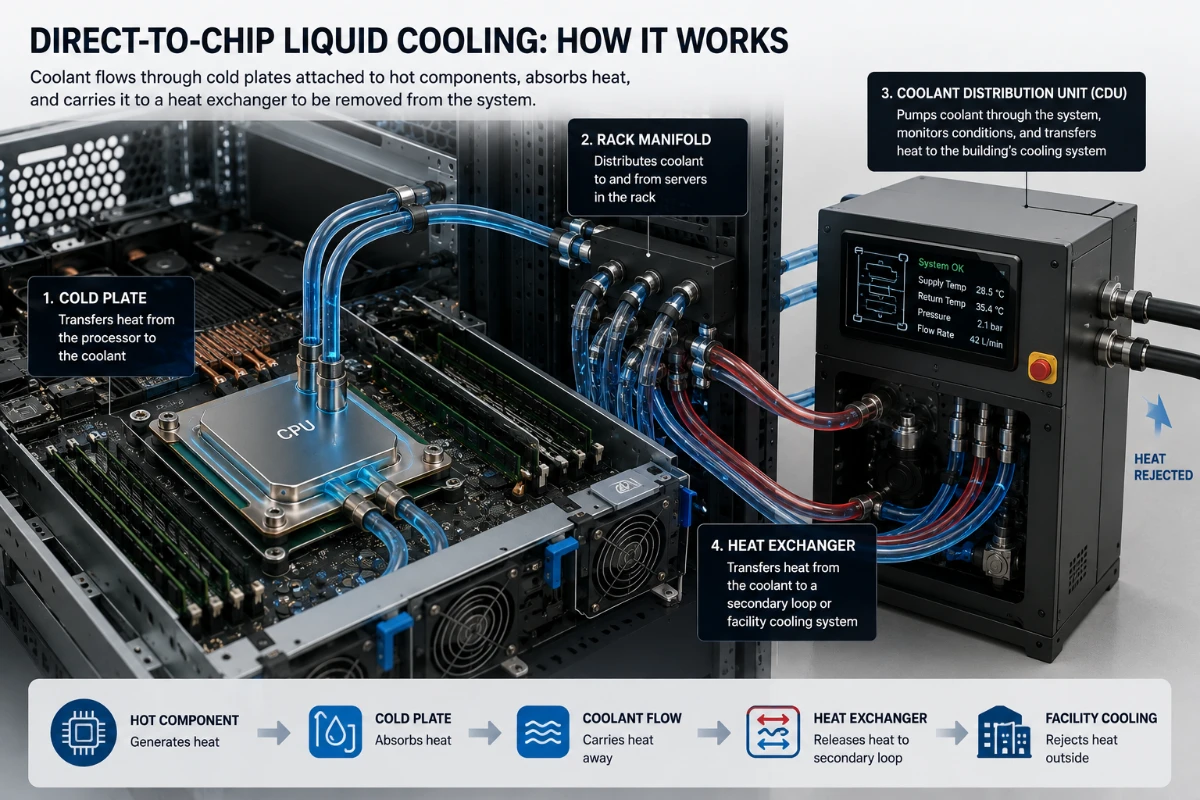
Direct-to-chip cooling is one of the most common approaches being adopted for high-density servers.
A metal component called a cold plate is attached to a processor or another heat-producing component. Narrow channels inside the plate allow coolant to flow close to the heat source.
As the fluid moves through the cold plate, it absorbs heat. The warmer coolant then travels through pipes to a heat exchanger, where the heat is transferred to another cooling loop or released outside the building.
A direct-to-chip system may include:
-
Cold plates
-
Flexible hoses
-
Rack manifolds
-
Pumps
-
Heat exchangers
-
Temperature and pressure sensors
-
Coolant distribution units
-
Quick-disconnect fittings
Open Compute Project guidance identifies cold plates, manifolds, coolant distribution units, heat exchangers, hoses and couplings as key parts of a liquid-cooled technology system.
Only selected components may be connected to liquid cooling. Fans can continue cooling the remaining hardware.
For this reason, many deployments are described as hybrid cooling systems.
What Is a Coolant Distribution Unit?
A coolant distribution unit, commonly called a CDU, controls the movement of cooling fluid between the servers and the larger facility system.
The CDU can perform several functions:
-
Circulate coolant through the racks
-
Control temperature and flow rate
-
Monitor pressure
-
Transfer heat between separate liquid loops
-
Protect sensitive IT equipment from unsuitable facility water
-
Detect abnormal operating conditions
Separating the loops is important because the coolant flowing near processors may require stricter cleanliness and material standards than the water used elsewhere in the building.
A heat exchanger inside the CDU transfers thermal energy between the two loops without necessarily mixing their fluids.
The system can therefore remove heat from the servers while maintaining controlled conditions around sensitive electronics.
Does Liquid Cooling Put Water Inside a Server?
Sometimes the cooling fluid is water-based, but the complete answer is more complicated.
Different systems may use:
-
Treated water
-
Water mixed with glycol
-
Specialized nonconductive fluids
-
Refrigerants
-
Other engineered coolants
The fluid depends on the equipment design, temperature range, materials and safety requirements.
Even when water is used, it normally travels through sealed cold plates, tubes and connections. It is not sprayed freely over electronic components.
Open Compute Project work on cold-plate systems covers single-phase water-based fluids, glycol-based coolants and two-phase fluids.
Operators must follow the specifications provided by the equipment manufacturer. Using an incompatible fluid can damage seals, corrode materials or reduce cooling performance.
What Is Immersion Cooling?
Immersion cooling is another form of liquid cooling.
Instead of attaching cold plates to individual processors, the system places entire servers—or major electronic components—inside a specially designed dielectric fluid.
A dielectric fluid does not conduct electricity in the same way ordinary water does, allowing it to contact compatible electronics safely when the system is designed correctly.
There are two major types of immersion cooling.
Single-phase immersion
The equipment is submerged in a liquid that remains in its liquid state as it absorbs heat.
Pumps move the warm fluid to a heat exchanger, where the heat is removed before the cooled fluid returns to the tank.
Two-phase immersion
The cooling fluid boils when it absorbs heat from the electronics.
The vapor rises, condenses on a cooled surface and falls back into the tank as a liquid.
Because the phase change can absorb substantial heat, two-phase systems may support very high thermal loads.
However, immersion cooling requires specialized servers, tanks, maintenance procedures and compatible materials. It is therefore not appropriate for every facility.
Direct-to-Chip Cooling vs. Immersion Cooling
Both approaches use liquid to improve heat removal, but they differ significantly.
Direct-to-chip cooling
-
Targets specific hot components.
-
Can be integrated into conventional server racks.
-
Often continues to use fans for other components.
-
May be easier to introduce gradually.
-
Requires pipes and connections throughout the racks.
Immersion cooling
-
Places most or all of the server hardware in cooling fluid.
-
Can remove heat from many components at once.
-
May reduce or eliminate server fans.
-
Requires specialized tanks and maintenance processes.
-
Can make routine component access more complicated.
Neither technology is universally superior.
Direct-to-chip systems may be more practical for facilities upgrading existing racks. Immersion cooling may be attractive for highly specialized environments where very high density or unusual operating conditions justify a larger redesign.
What Are the Potential Benefits of Liquid Cooling?
Higher computing density
Liquid cooling can help facilities operate more powerful equipment within each rack.
This may reduce the amount of floor space required for a given level of computing capacity.
Lower fan energy
When liquid removes heat directly from processors, server and facility fans may not need to move as much air.
This can reduce part of the energy used by the cooling system.
Improved processor performance
Modern processors may reduce their speed when they become too hot. More effective cooling can help equipment maintain its designed performance during sustained workloads.
Less dependence on very cold air
Some liquid-cooling designs can operate with warmer coolant temperatures than traditional chilled-water systems.
This may reduce or eliminate the need for energy-intensive mechanical refrigeration under suitable conditions.
Potential for heat reuse
Liquid can carry heat at a higher and more consistent temperature than warm exhaust air.
This may make it easier to reuse the heat for:
-
Building heating
-
Hot-water systems
-
Industrial processes
-
District heating networks
Heat reuse is highly dependent on location. A facility needs a nearby and economically practical use for the recovered thermal energy.
Reduced floor-space pressure
Higher rack density can allow more computing equipment to fit into an existing building.
However, the facility must still provide sufficient power, structural capacity and cooling infrastructure.
Does Liquid Cooling Always Save Energy?
No. Liquid cooling can reduce some cooling-energy requirements, but the total result depends on the system.
Pumps consume electricity. Heat exchangers and outdoor heat-rejection equipment also require energy. Poorly designed liquid loops can create unnecessary pressure losses and operating costs.
The overall efficiency depends on:
-
Coolant temperature
-
Outdoor climate
-
Pump design
-
Pipe length
-
Rack density
-
Heat-exchanger performance
-
Remaining air-cooling requirements
-
The efficiency of the computing hardware
-
How heavily the servers are used
The U.S. Department of Energy’s COOLERCHIPS program is funding research aimed at reducing cooling-energy use for high-density computing systems to less than 5 percent of their IT load. This is a research target, not a description of all current liquid-cooled facilities.
Claims about large energy savings should therefore be tied to a particular design, test or operating environment.
Does Liquid Cooling Reduce Water Use?
Not necessarily.
Liquid cooling describes how heat is removed from computing equipment. It does not automatically determine how the facility releases that heat into the environment.
A liquid-cooled data center may reject heat using:
-
Dry coolers
-
Cooling towers
-
Chillers
-
Evaporative systems
-
A nearby water source
-
A district energy system
-
A combination of technologies
Some designs can reduce direct water consumption, especially when they use closed loops and dry heat rejection.
Other designs may still depend on cooling towers that consume water through evaporation.
Water use must therefore be evaluated across the entire facility, not just at the server rack.
The Department of Energy notes that data-center cooling towers can be water-intensive and recommends strategies for improving their water efficiency.
A company should not describe a system as “water-free” unless the complete cooling process has been evaluated.
What Are the Main Challenges?
Leaks
The possibility of coolant escaping near electronic equipment is one of the most obvious concerns.
Reliable systems use carefully selected materials, secure fittings, monitoring sensors and leak-detection procedures.
Quick-disconnect fittings can allow technicians to attach or remove equipment while limiting fluid loss, but the connections must be compatible and maintained properly.
Retrofitting older facilities
Many existing data centers were designed only for air-cooled equipment.
Adding liquid cooling may require:
-
New pipes
-
Coolant distribution units
-
Heat exchangers
-
Floor or overhead supports
-
Leak monitoring
-
Drainage planning
-
Changes to maintenance procedures
ASHRAE recommends that new data-center designs consider the ability to add liquid cooling in the future because retrofitting can introduce cost and complexity.
Coolant quality
Impurities can block narrow channels, reduce heat transfer or damage system materials.
Operators must manage filtration, corrosion, biological growth and chemical compatibility.
Open Compute Project guidance emphasizes preparing and cleaning secondary cooling loops before operation so that coolant can circulate correctly through racks.
Material compatibility
Coolants, seals, hoses, metals and plastics can react with each other over time.
A fluid suitable for one design may not be suitable for another.
Maintenance training
Technicians accustomed to air-cooled servers need new procedures for working with pumps, valves, hoses and fluid systems.
Vendor compatibility
Equipment from different suppliers may use different temperature ranges, pressure requirements, fittings or coolant specifications.
Industry standards can reduce this problem, but compatibility must still be confirmed for each deployment.
Cost
Liquid cooling can require higher initial investment in equipment and building infrastructure.
The financial case is usually stronger when higher rack density, lower cooling energy or improved hardware performance offsets the installation cost.
Can Existing Data Centers Adopt Liquid Cooling?
Many can, but the difficulty varies.
A facility with sufficient power, space and access to the cooling system may add CDUs and liquid-cooled racks gradually.
Other buildings may require major modifications.
Operators must evaluate:
-
Available electrical capacity
-
Floor loading
-
Pipe routes
-
Heat-rejection capacity
-
Water and coolant requirements
-
Leak-response plans
-
Equipment compatibility
-
Remaining air-cooling demand
-
Maintenance access
A hybrid deployment is often a practical transition.
Traditional servers can remain air cooled while selected AI or high-performance racks use liquid. The facility can expand liquid infrastructure as demand increases.
The Department of Energy offers guidance and training specifically addressing when enterprise data centers should consider liquid cooling and how to manage the transition from conventional systems.
Will Air Cooling Disappear?
Air cooling is unlikely to disappear from data centers.
Many storage systems, network switches and general business servers do not produce enough heat to require liquid cooling.
Even liquid-cooled servers may still use fans for components not connected to cold plates.
Data centers also need air management for humidity, worker comfort and heat produced by power equipment.
The more likely outcome is a mixed environment:
-
Air cooling for lower-density equipment
-
Direct-to-chip cooling for high-power processors
-
Immersion cooling for specialized installations
-
Hybrid racks combining liquid and air
-
Different systems in different parts of the same facility
Cooling technology will increasingly be selected according to the workload rather than applied uniformly across the entire building.
How Liquid Cooling Could Support Heat Reuse
One potential advantage of liquid cooling is that it can collect heat in a more usable form.
Warm air leaving a server may be difficult to transport over long distances. Warm water can move through insulated pipes to another part of a building or a nearby customer.
Possible applications include:
-
Heating offices
-
Heating residential buildings
-
Warming greenhouses
-
Providing hot water
-
Supporting certain industrial processes
However, heat reuse requires more than installing liquid cooling.
The data center and the heat customer must be close enough to make a connection economical. Their demand must also match.
A residential heating network may need the most heat during winter, while a data center produces heat throughout the year.
Equipment may be required to raise the water temperature to a useful level.
Heat reuse can be valuable, but it should be treated as a location-specific engineering project rather than an automatic benefit.
How Liquid Cooling Affects Data-Center Design
As liquid cooling becomes more common, data centers may be designed differently.
Future facilities may include:
-
Water or coolant pipes running directly to server rows
-
Space for coolant distribution units
-
Dedicated leak-detection systems
-
Stronger floors for dense computing racks
-
Larger electrical connections
-
Outdoor dry coolers or heat exchangers
-
Infrastructure for exporting waste heat
-
Separate cooling zones for different equipment types
New facilities can plan for these features from the beginning.
Existing buildings may need modular systems that allow operators to upgrade selected areas without rebuilding the entire site.
Cooling design is also becoming more closely connected to server design. Processor manufacturers, server companies and facility engineers must coordinate temperature, flow and pressure requirements.
What Should Companies Consider Before Adopting It?
Liquid cooling should solve a defined technical or financial problem.
Before selecting a system, an organization should ask:
-
What rack density must the facility support?
-
Can air cooling meet the requirement efficiently?
-
Which components require liquid cooling?
-
Is direct-to-chip or immersion cooling more appropriate?
-
Can the building reject the additional heat?
-
What fluid and material standards are required?
-
How will leaks be detected and managed?
-
Can technicians service the equipment safely?
-
Will the system reduce total operating costs?
-
Can the infrastructure support future hardware generations?
The answer may be different for an AI research cluster, a cloud provider, a university and a small enterprise data center.
What Happens Next?
Liquid cooling is moving from specialized supercomputing environments into more mainstream data-center deployments.
The transition is being driven by:
-
Higher processor power
-
Increased rack density
-
Growth in AI workloads
-
Pressure to improve energy efficiency
-
Limited space in existing facilities
-
Demand for more consistent hardware performance
Industry groups are developing specifications for cold plates, coolants, connectors and facility interfaces. These efforts aim to make liquid-cooled equipment easier to deploy across different data centers.
The technology will continue to evolve. Future designs may use warmer coolant, more efficient pumps, advanced two-phase fluids and closer integration between processors and cooling hardware.
However, liquid cooling will not remove the need to improve software and computing efficiency.
The most sustainable system is not only one that removes heat efficiently. It is also one that avoids unnecessary calculations and uses appropriate hardware for each task.
The Bottom Line
Data centers must remove heat continuously to keep their computing equipment operating safely and reliably.
Traditional air cooling remains effective for many workloads, but powerful AI processors are increasing the amount of heat concentrated inside individual server racks.
Liquid cooling addresses this problem by carrying heat away from processors through cold plates, pipes, coolant distribution units or immersion systems.
It can support higher computing density, reduce dependence on high-volume airflow and create opportunities for improved energy efficiency and heat reuse.
The technology also introduces new challenges, including leaks, fluid quality, maintenance, compatibility and retrofit costs.
Liquid cooling is therefore not a universal replacement for air conditioning. It is an additional tool for environments where conventional airflow can no longer manage heat efficiently.
As data centers install more powerful computing systems, hybrid designs combining air and liquid cooling are likely to become an increasingly common part of the industry.
Comments 0